Offline appOfficial Zeyto
Visitor Pass and ID Badge Printer with Photo and Visit Log
An offline app for receptionists, security officers and office managers who issue visitor, contractor and staff badges.
Badges that all look the same and are logged.
At a glance
- FormatOffline app, opens in your browser
- DeliveryInstant download
- In the box2 files, 70 KB
- Works withA modern browser: Chrome, Edge, Safari or Firefox
- OfflineRuns offline in your browser
- Made forUAE businesses
How it works
- 1BuyPay on Stripe’s secure page.
- 2DownloadYour order page opens at once with a secure link.
- 3Open and useUnzip it and open index.html in your browser.
See it first
Look before you pay: screenshots, a short walkthrough and a live demo you can click through.
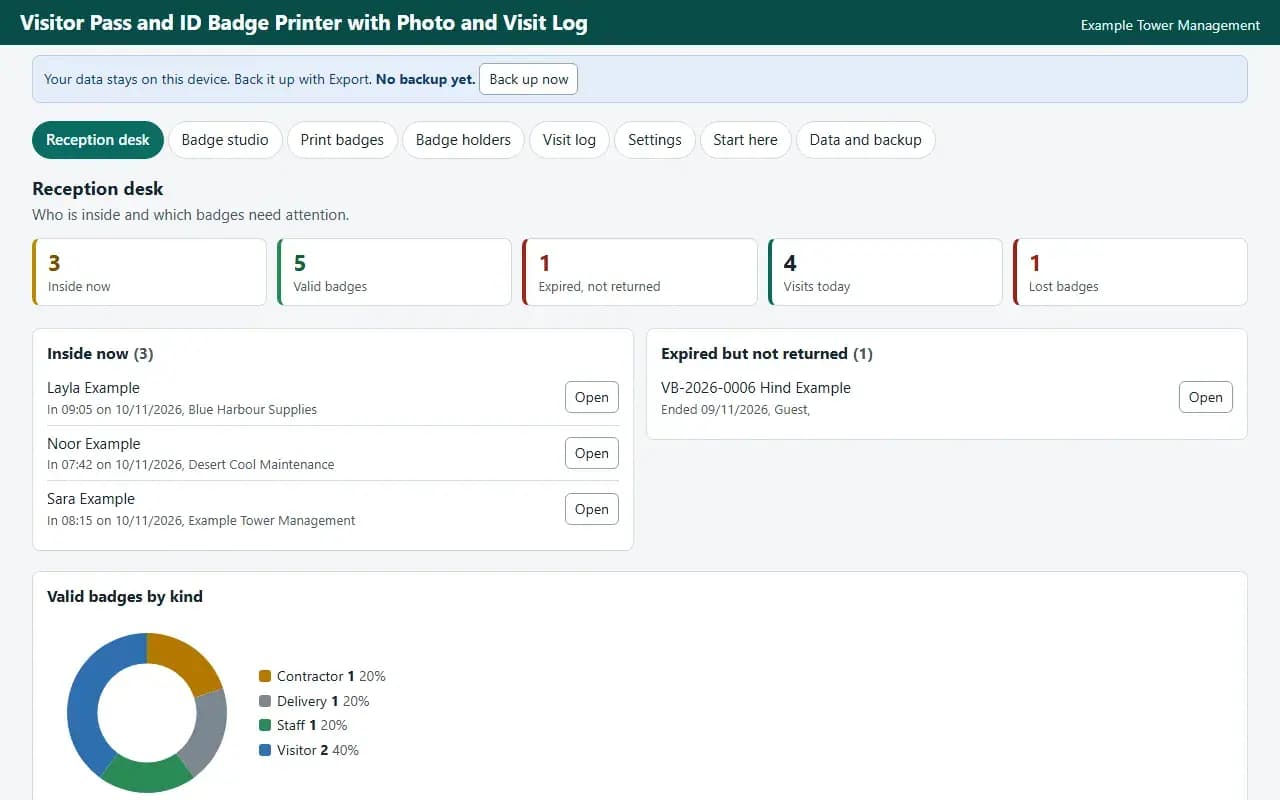
Reception desk, with the example data
Try it now
Click through the real app. No download, no sign-up.
Demo with fictional example data. Nothing you type is saved. Printing, export and backup are switched off in the demo; the full app has them.
What you get
- Photo from your own file
- CR80, A6 and 4 up A6 printing
- Sign in and out log
- Expired badge list
- Photo removal for finished badges
- Backup and CSV
Files and sizes (2)
- visitor-pass-and-id-badge-printer-uae.zip63 KB
- README.txt7.3 KB
2 files, 70 KB in total. You download them from your order page after payment.
What it does not do
- It scans no ID, opens no door and cannot drive a card printer.
- Paper badges can be copied.
- Your data stays in one browser on one device: no cloud sync, so export a backup.
- It does not scan or read an ID document, does not check anyone against a list, does not open a door or program a card.
After you buy
- Instant downloadYour order page opens right after payment with a secure link for each file. The link is emailed to you too.
- A fresh link any timeLinks last 48 hours. Enter your order reference and the email you paid with and we will send a new one.
- Help is one email awayWrite to support@zeyto.app with your order reference. The team answers every enquiry.
- Fix, replace or refundIf a file is damaged, will not open, or is materially different from its listing, tell us within 7 days of the sale and we will fix it, replace it or refund you.
Find my purchasesContact the Zeyto teamMarketplace terms
Full refund wording
Digital downloads (files, templates, skill packs, guides) are delivered straight away, so they are not refunded once downloaded. If a file is damaged, will not open, or is materially different from its listing, tell us within 7 days of the sale and we will fix it, replace it or refund you.
Applies to products sold by Zeyto itself. None of this takes away rights you have under UAE law.
About this product
Read the full description
Visitor Pass and ID Badge Printer is an offline app (one HTML file in a zip) for a reception or security desk. You add a person once, choose a photo from a file on your computer, and the app numbers the badge, draws it with the name, company, host and validity dates, and prints it on CR80 card stock (ten to an A4 sheet), on A6, or four A6 badges to an A4 sheet. A log records when each person signed in and out, and badges that expired but were not returned are listed.
The problem it removes: Badges written by hand or typed into a template one at a time look different every day, have no number, are never recorded, and nobody knows which are still out. This app keeps one list, draws every badge the same way and prints a sheet in one go.
What is inside:
- Badge holders numbered VB with the year, kind, company, host, access note, validity dates and status
- A photo chosen from a file on your computer, cropped and shrunk on the device and stored with the record, never uploaded
- CR80 card sheet with ten to an A4 page and cut marks, A6 one per page, and four A6 to an A4 landscape sheet
- A start position for a part used sheet and a shift setting for printers that drift
- Sign in and sign out with the time, a list of who is inside now, and badges expired but not returned
- A button that removes the photos from badges that are finished
- Example data you can load in one click, a Start here guide and an Honest limits panel
- JSON backup and restore, CSV export, and CSV import with a check of every row before anything is added
Who it is for: A receptionist, security officer, office manager or site clerk who issues visitor, contractor, delivery and staff badges and wants a clean printed badge and a record. One person at one computer.
What it is NOT: It does not scan or read an ID document, does not check anyone against a list, does not open a door or program a card, and does not drive a plastic card printer: it prints pages that you cut or put into a card holder. It does not make a badge secure, because paper can be copied. It does not decide who may enter. It is not legal, tax or accounting advice, it is not connected to any government system, bank or messaging service, and it does not file or send anything by itself. UAE e-invoicing is not part of it.
Your data stays on this device in your browser. Back it up with Export; clearing browser data loses it otherwise.
Verified by us: scripted tests in Chromium (104 checks through the real screens: adding, editing and deleting records in every table, required-field messages, backup then clear then restore, CSV export then import, keyboard order, print layouts rendered to PDF, no horizontal scrolling at 375 and 1280 pixels, no network requests) and an independent recalculation by a separately written Python evaluator of 299 calculated values (25 randomised rows plus the example data) with 0 mismatches. Safari engine (WebKit): smoke test passed; Firefox: could not be launched. Not tested: Firefox beyond what is stated here, and no real printer was used (print layouts were checked as PDF).
Questions
Who is it for?
What do I need to use it?
How do I get it?
What if the file is wrong?
Visitor Pass and ID Badge Printer with Photo and Visit Log: AED 59
Pay once, download at once.
Damaged, will not open or not as listed? Tell us within 7 days and we fix it, replace it or refund you.
Questions before you buy? Contact the Zeyto team. This is sold by Zeyto (Emeron Infospace FZE) itself, not by an independent seller. See the marketplace terms.
Not sure it is the right one?
Works well with
Other official products that cover the same ground or finish the job.
- Download
Parking Permit and Gate Pass Printer with Expiry List
Offline permit desk for a building or compound: numbered parking permits with plate, bay and validity dates, a clash check that stops two active permits on one plate or bay, one day gate passes, window sticker sheets, and a list of permits expiring soon.
Also about uaeAED 49Instant download - Download
Cheque Printer with Layout Designer, Calibration and Register
Offline cheque printing for your own cheque book: design a layout in millimetres with a live ruler preview, calibrate each printer, print single or batch cheques with amount in words in English and Arabic, and keep a register that never reuses a number.
Also about uaeAED 99Instant download - Download
Recurring Cleaning Contract Visit and Monthly Billing Tracker
Offline tracker for a cleaning company with monthly contracts: a visit log per contract, visits still owed this month, an option to credit visits the company missed, one button to create last month's draft bills, invoice numbers, unpaid ageing and a printed visit statement.
Also about uaeAED 59Instant download - Download
Clinic and Dental Practice Visit, Revenue and Claims Tracker
An Excel billing tracker for a small clinic or dental practice: revenue by department, payer and provider, what patients and insurers still owe, claims ageing and actions. Built to hold no health data.
Also about uaeAED 109Instant download