Offline POS software for UAE retail shops

A till that waits for the internet is a till that loses sales. Zeyto's POS saves sales on the PC when the server cannot be reached, sends them in order when the link returns, and posts every receipt as a simplified tax invoice with 5% VAT.

Screenshot from the Zeyto demo company, with sample data.
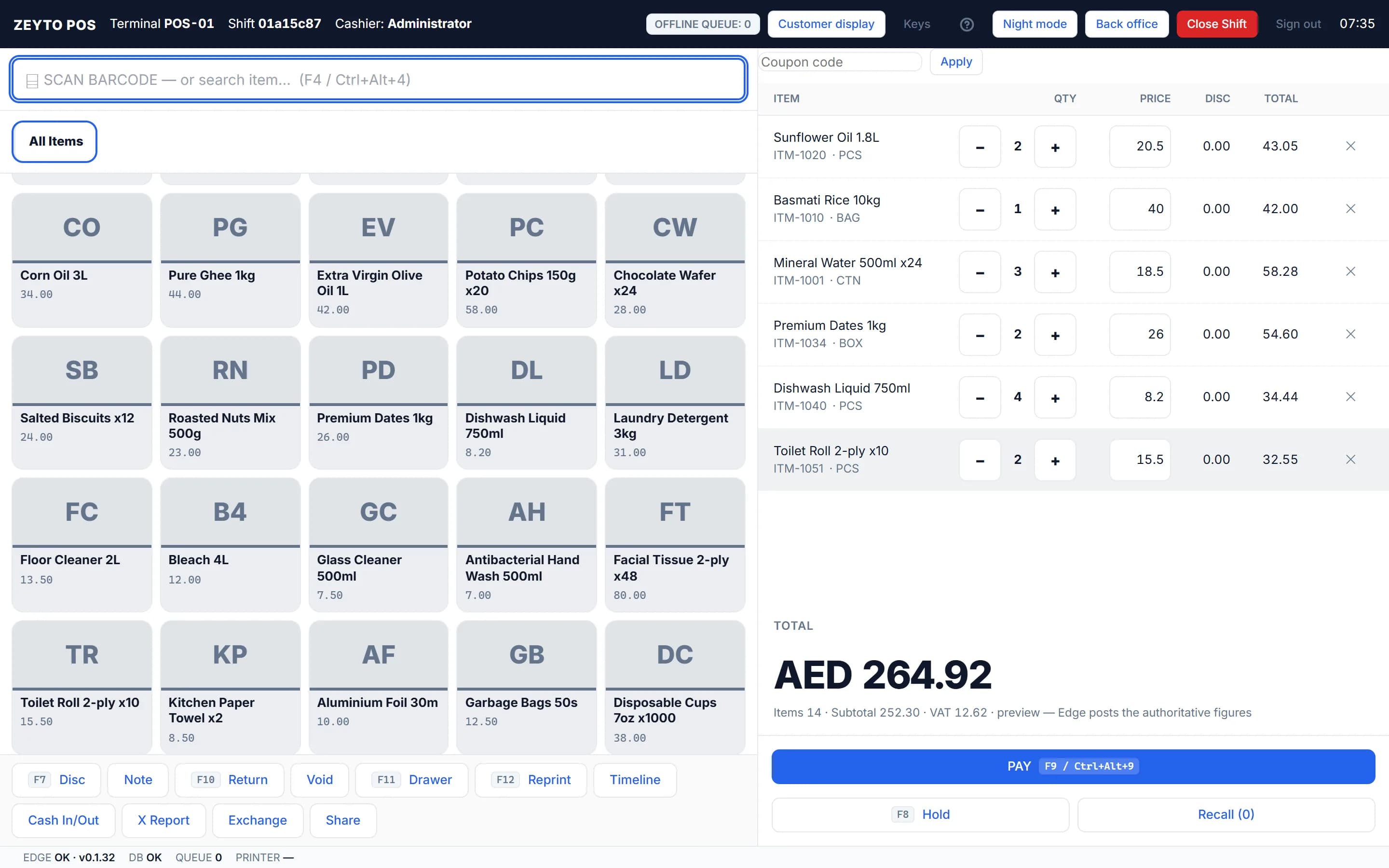
Zeyto POS in the demo company: a till screen with items, quantities and the payment total

The sale path never blocks

What happens when the connection drops

If the server cannot be reached, or refuses a sale because of the state of the books, the till saves the sale on this PC with a temporary number such as POS-LOCAL-1, the receipt says OFFLINE, and a Waiting to send counter goes up. Zeyto sends the queue by itself, oldest first, using the same reference each time, so a replay can never post a sale twice.

Read more

For example, at 10:15 the link fails and three sales of AED 94.50, 47.25 and 210.00 are taken. The badge reads Waiting to send: 3 and the receipts are numbered POS-LOCAL-1 to -3. When the link returns they are sent in order and finalised with real POS numbers. A sale refused for its content, such as not enough stock or a price you may not change, is not accepted: the screen says Rejected and why.

Offline behaviour

What keeps working offline and what needs the server

  • Works offlineSelling, taking payment, printing receipts, holding and recalling carts, and cash in/out within the manager limit (queued).
  • Needs the serverRefunds, voids and exchanges (the manager PIN is checked live), opening the cash drawer by hand (F11), the X report and the Z report of the shift, and a paid out above the manager limit.
  • Costing noteAn item sold beyond stock while offline is costed provisionally, and the header shows a notice such as Sold beyond stock offline: 2 (cost provisional).

At the counter

Payment, change and receipts

  • Split tenderPress PAY (F9), tap a payment mode and adjust amounts until REMAINING reaches zero. Change can only come from cash. Card and cheque modes ask for a reference number.
  • Selling on accountThe On account button sells on credit to a real customer. Zeyto warns or refuses if the customer is over the credit limit, depending on Credit Control.
  • ReceiptsReceipts print straight after the sale by default, on an 80 mm or 58 mm roll through an ESC/POS printer. Each is numbered like POS-00001, the prefix set in Settings, Numbering.
  • Weighed items and serialsEAN-13 scale labels carry the weight, and Serial / IMEI scanning can be Required, Optional or Off for phone and electronics shops.

VAT

Every receipt is a simplified tax invoice

Each finished sale is posted as a POS receipt, a simplified tax invoice. A cash sale with taxable 90.00 and VAT 4.50 posts debit Cash in Hand 94.50, credit Sales 90.00 and credit VAT Output 4.50, and the cost entries follow for stock items. The VAT lands in the return through the item's tax code, so the Return Worksheet needs no re-keying. Cabinet Decision No. 100 of 2025 changed the invoice articles for the e-invoicing reform, and the simplified invoice option is reported to end for businesses once they are onboarded to e-invoicing, so check the Ministry of Finance timetable for your revenue group. For UAE e-invoicing, Zeyto's connection to an Accredited Service Provider is not released yet, so we do not claim e-invoicing readiness.

Control

Controls a shop owner can switch on

  • Manager PIN for refunds, voids, exchanges and large paid outs
  • Blind count so the cashier counts the drawer without seeing the expected figure
  • Closing variance limit: a short or over larger than the limit needs a manager before anything is posted
  • POS Audit: every price override, line void, manual discount and reprint is recorded with who, which till, why and which manager approved. The lines cannot be changed or deleted
  • Day Close locks the day once every shift is closed

Check the hardware and settings first Settings change behaviour, never the amounts posted, and take effect on a till after it is reloaded. POS must be in the licence. Test your receipt printer with the Print test page button and check the Waiting to send badge at the end of every day: close the shift only when the count is zero. This page is general information and was last reviewed on 8 November 2026.

Next step

See the ERP running before you decide

Open the public demo, install the Windows trial, or talk to the Zeyto team about your workflow.

Try the live demo

No install needed

User
admin
Password
demoAdmin123
POS PIN
1234

Demo data refreshes nightly to keep the sample company clean.

Open live demo

Install the trial

Your own PC

Run Zeyto cloud, private cloud, on-premise or on a local server, with desktop shell, browser access and the mobile app.

Talk to Zeyto

Sales, support, partners

Send your industry, branch count, users and reporting needs. We route you to the right person.

FAQ

Straight answers

Does the POS work without internet?
Yes. Sales, payments, receipt printing and held carts keep working. Sales are saved on the PC with a temporary number and sent to the server in order when the connection returns. Refunds, voids and exchanges need the server because the manager PIN is checked live.
Can the same sale be posted twice after a reconnect?
No. Zeyto sends the queue oldest first using the same reference each time, so a replay can never post a sale twice.
What printers does the POS support?
Receipt printers that speak ESC/POS, on an 80 mm or 58 mm roll, connected by USB, as a Windows printer or on a network address. Add the printer in Settings, Printers and press Print test page.
Can I sell on credit at the till?
Yes, to a real customer with the On account button. Zeyto warns or blocks sales over the customer's credit limit depending on your Credit Control setting.
Is the POS receipt a valid tax invoice?
Each finished sale posts as a POS receipt, a simplified tax invoice, with your TRN and the VAT amount. Rules for simplified invoices are changing with the e-invoicing reform, so check the FTA and the Ministry of Finance for your business.

Try the POS with the cable unplugged

Open the demo, make a sale and see how the till behaves.