Offline appOfficial Zeyto
Shift Rota Builder App for Shops, Restaurants and Clinics
An offline app for shops, restaurants, clinics and any team that rosters shifts by the week.
Build next week's rota without double booking.
At a glance
- FormatOffline app, opens in your browser
- DeliveryInstant download
- In the box2 files, 32 KB
- Works withA modern browser (tested in Chromium and WebKit)
- OfflineRuns offline in your browser
How it works
- 1BuyPay on Stripe’s secure page.
- 2DownloadYour order page opens at once with a secure link.
- 3Open and useUnzip it and open index.html in your browser.
See it first
Look before you pay: screenshots, a short walkthrough and a live demo you can click through.
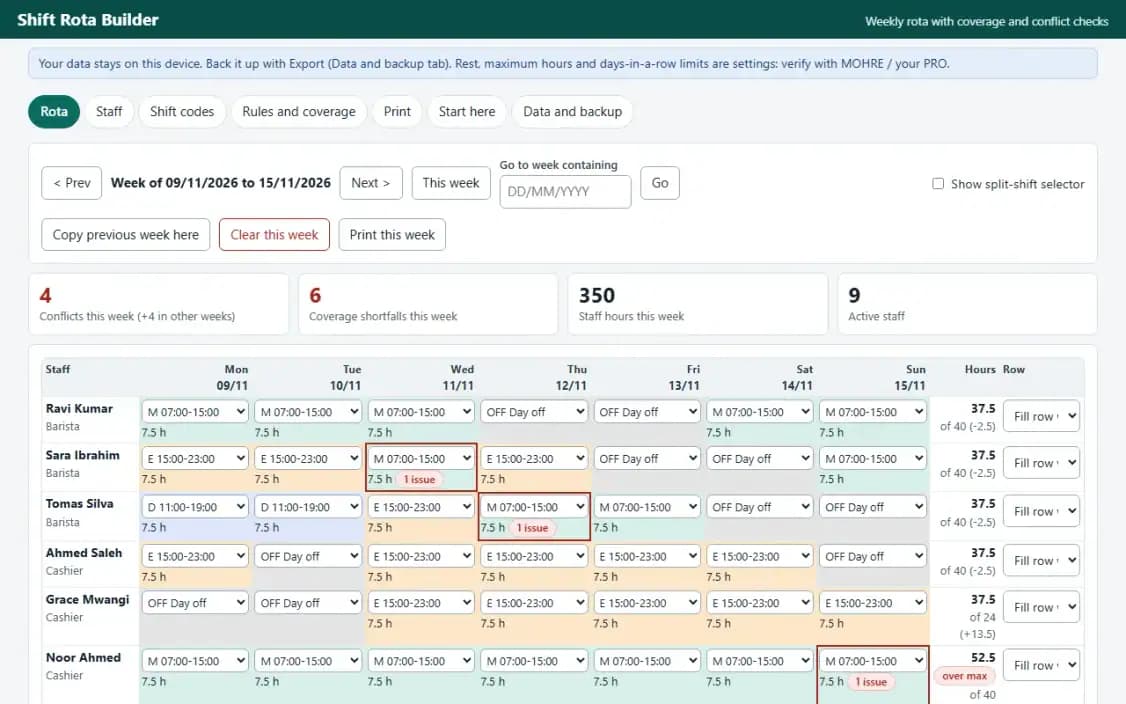
Rota, with the example data
Try it now
Click through the real app. No download, no sign-up.
Demo with fictional example data. Nothing you type is saved. Printing, export and backup are switched off in the demo; the full app has them.
What you get
- Weekly rota grid with split shifts, fill row and copy week
- Coverage checks by role and time window, minute by minute
- Rest-gap, days-in-a-row, weekly-hours and overlap conflict checks
- A4 landscape print for one week or a batch of weeks
- Staff CSV import, rota and conflict CSV export, JSON backup
- Example data with deliberate conflicts to learn from
Files and sizes (2)
- shift-rota-builder-app-uae.zip27 KB
- README.txt4.7 KB
2 files, 32 KB in total. You download them from your order page after payment.
What it does not do
- Set your own limits.
- It publishes nothing to staff and takes no swaps, clock-ins or pay.
- Your data stays in one browser on one device: no cloud sync, so export a backup.
- It does not publish the rota to staff, take swaps or requests, record clock-in times.
After you buy
- Instant downloadYour order page opens right after payment with a secure link for each file. The link is emailed to you too.
- A fresh link any timeLinks last 48 hours. Enter your order reference and the email you paid with and we will send a new one.
- Help is one email awayWrite to support@zeyto.app with your order reference. The team answers every enquiry.
- Fix, replace or refundIf a file is damaged, will not open, or is materially different from its listing, tell us within 7 days of the sale and we will fix it, replace it or refund you.
Find my purchasesContact the Zeyto teamMarketplace terms
Full refund wording
Digital downloads (files, templates, skill packs, guides) are delivered straight away, so they are not refunded once downloaded. If a file is damaged, will not open, or is materially different from its listing, tell us within 7 days of the sale and we will fix it, replace it or refund you.
Applies to products sold by Zeyto itself. None of this takes away rights you have under UAE law.
About this product
Read the full description
Shift Rota Builder is an offline app for managers who still build the weekly rota on paper, in WhatsApp or in a spreadsheet and only find out about a thin shift, a short turnaround or a seventh day in a row when it has already happened. You define shift codes and staff once, pick a code in each cell of the week, and the app counts hours and checks the rota against the rules you enter.
What it does:
- Weekly grid with a keyboard-friendly selector in every cell (no dragging, works on a phone), a second selector for split shifts, fill a row, copy last week, clear a week, go to any week by typing a date as DD/MM/YYYY
- Shift codes with start, end and unpaid break; overnight shifts such as 22:00 to 06:00 are handled; OFF, AL and SL for days away
- Coverage rules by day, role and time window ("at least 2 baristas present from 07:00 to 15:00"), checked minute by minute with overnight shifts counted on both days; the first short window is shown for every day
- Conflict checks: rest gap between shifts (also across weeks), shift too long, too many days in a row, weekly hours over your maximum, overlapping shifts, leave and a shift on the same day; click an issue to jump to the week
- Hours per cell, per person per week against contracted hours, and per day (people on shift and staff hours)
- A4 landscape print for one week or a batch of weeks, with legend, coverage summary and conflicts; CSV export of the rota and of the conflicts; staff CSV import with line-numbered errors; JSON backup and restore
The problem it solves: a thin shift or a tired team found out on the day. Instead of re-reading the grid by eye, you see the shortfalls and conflicts as you build the week.
Rules are settings. Minimum rest, maximum shift length, days in a row and weekly hours start blank, with a warning, and the checks for a blank limit stay off. You enter the values that apply to you; the example data uses example numbers only. Verify with MOHRE / your PRO / your contract.
What it is not: it does not publish the rota to staff, take swaps or requests, record clock-in times, calculate pay or know any labour law. It is not connected to any government system. For a spreadsheet-based attendance and overtime planner see the separate Staff Attendance, Overtime and Shift Planner; this app is a working offline tool with validation, imports and tested checks.
Verified by driving the real app in headless Chromium: 45 scripted checks (dates, week starts across year end and the leap day, validation, CSV import, backup round trip, print preview and a 3-page landscape PDF) and 50 random rotas (2,868 cells, 858 coverage checks, 756 conflicts) compared with an independent minute-by-minute Python model with zero mismatches. The scripted flows also ran in WebKit. Firefox could not be launched on the test machine, so it was not tested there. Not tested in Microsoft Edge or on a physical phone (the layout was checked at 375 px wide).
Questions
Who is it for?
What do I need to use it?
How do I get it?
What if the file is wrong?
Shift Rota Builder App for Shops, Restaurants and Clinics: AED 99
Pay once, download at once.
Damaged, will not open or not as listed? Tell us within 7 days and we fix it, replace it or refund you.
Questions before you buy? Contact the Zeyto team. This is sold by Zeyto (Emeron Infospace FZE) itself, not by an independent seller. See the marketplace terms.
Not sure it is the right one?
Works well with
Other official products that cover the same ground or finish the job.
- Download
UAE HR Offline Apps Bundle: 10 Working Tools for Leave, Payslips, Rota and More
Ten offline HR apps in one zip: leave, timesheets and overtime, payslips, onboarding, probation, document expiry, shift rota, org chart, recruitment and training. Open by double-click, data stays on your device. AED 491 less than buying separately.
Also about hr, offline-appAED 349Instant download - Download
Org Chart Builder App: Auto-Layout, Print and Export (UAE)
Offline org chart app: list your people and who reports to whom, and it draws the chart for you. Print on A4, export SVG or PNG, collapse branches, see headcount and span of control.
Also about hr, offline-appAED 69Instant download - Download
Volunteer Sign-Up and Shift Sheet for Community Events
Offline volunteer roster for community events: shifts with places needed, sign-ups that stop overbooking and clashes, a waiting list, reminders and hours, and a printable sign-in sheet for each shift.
Also about shifts, offline-appAED 49Instant download - Download
Cleaning Job Schedule and Crew Assignment Calendar
Offline scheduler for a cleaning company: jobs with a crew, a start time and hours, a rule that refuses a job overlapping another job of the same crew, a travel gap setting, an overloaded day flag, a calendar, jobs to confirm with WhatsApp, and a printed crew sheet and job card.
Also about scheduling, offline-appAED 59Instant download