Offline appOfficial Zeyto
Org Chart Builder App: Auto-Layout, Print and Export (UAE)
An offline app for businesses, clinics, schools and contractors with 5 to a few hundred people.
Draw the org chart from a people list.
At a glance
- FormatOffline app, opens in your browser
- DeliveryInstant download
- In the box2 files, 32 KB
- Works withA modern browser (tested in Chromium and WebKit)
- OfflineRuns offline in your browser
How it works
- 1BuyPay on Stripe’s secure page.
- 2DownloadYour order page opens at once with a secure link.
- 3Open and useUnzip it and open index.html in your browser.
See it first
Look before you pay: screenshots, a short walkthrough and a live demo you can click through.
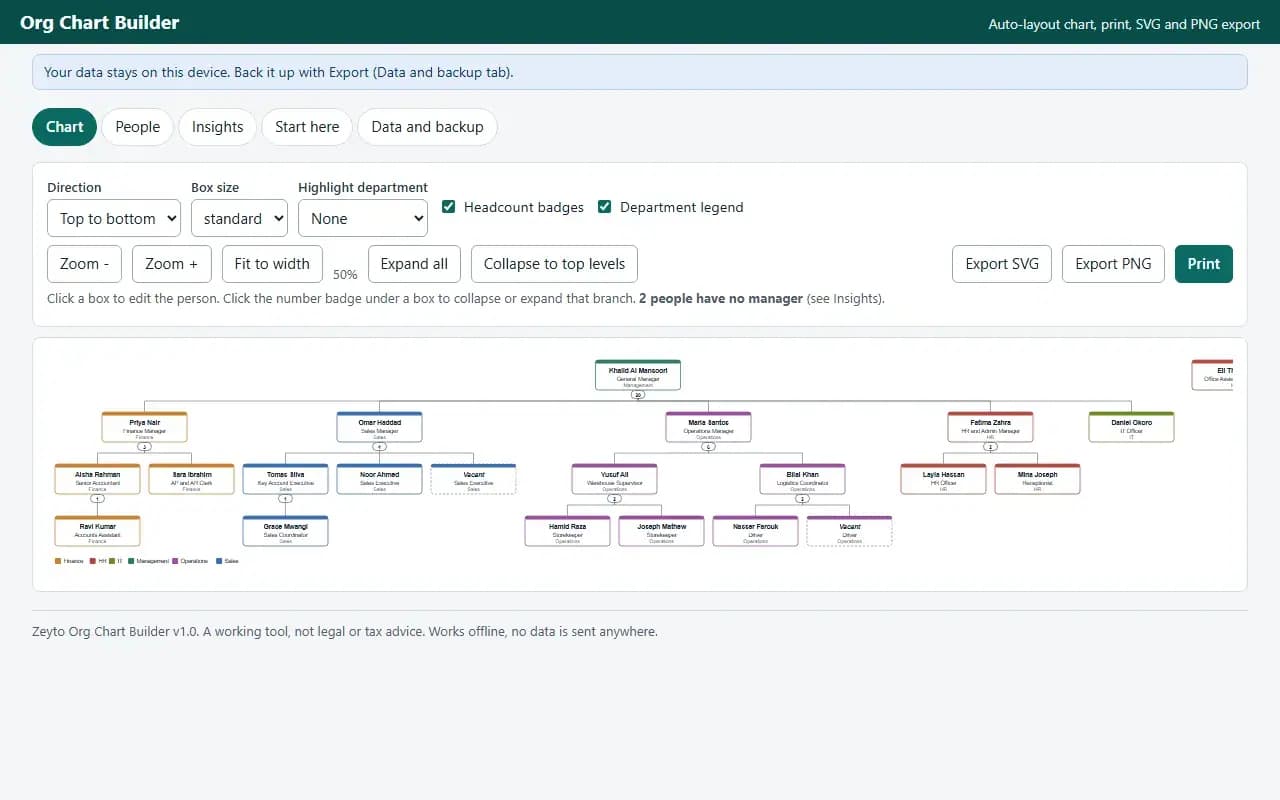
Chart, with the example data
Try it now
Click through the real app. No download, no sign-up.
Demo with fictional example data. Nothing you type is saved. Printing, export and backup are switched off in the demo; the full app has them.
What you get
- Automatic chart layout, top to bottom or left to right
- Collapse branches, highlight a department, vacant positions
- A4 print (one page or per branch), SVG and PNG export
- People CSV import with line-numbered errors and CSV export
- Headcount, span of control, levels and checks
- Example data to learn from, JSON backup and restore
Files and sizes (2)
- org-chart-builder-app-uae.zip27 KB
- README.txt5.0 KB
2 files, 32 KB in total. You download them from your order page after payment.
What it does not do
- Each person has one manager.
- No dotted lines, photos, salary or approvals.
- Your data stays in one browser on one device: no cloud sync, so export a backup.
After you buy
- Instant downloadYour order page opens right after payment with a secure link for each file. The link is emailed to you too.
- A fresh link any timeLinks last 48 hours. Enter your order reference and the email you paid with and we will send a new one.
- Help is one email awayWrite to support@zeyto.app with your order reference. The team answers every enquiry.
- Fix, replace or refundIf a file is damaged, will not open, or is materially different from its listing, tell us within 7 days of the sale and we will fix it, replace it or refund you.
Find my purchasesContact the Zeyto teamMarketplace terms
Full refund wording
Digital downloads (files, templates, skill packs, guides) are delivered straight away, so they are not refunded once downloaded. If a file is damaged, will not open, or is materially different from its listing, tell us within 7 days of the sale and we will fix it, replace it or refund you.
Applies to products sold by Zeyto itself. None of this takes away rights you have under UAE law.
About this product
Read the full description
Org Chart Builder is an offline app for owners and HR managers whose organisation chart lives in a PowerPoint slide that nobody dares to touch, because moving one box means nudging twenty others. You enter people once (name, job title, department, who they report to) and the app draws and re-draws the chart for you: every manager is centred above their team, levels line up, and nothing overlaps.
What it does:
- People list with department colours (automatic, editable), optional location, email and phone, and vacant positions drawn with a dashed box that are not counted as headcount
- Automatic tidy tree layout, top to bottom or left to right, three box sizes, several top-level people side by side, zoom and fit to width
- Collapse or expand any branch with the number badge, highlight one department, show or hide badges and the legend
- The manager list never offers someone below you, so a reporting loop cannot be created; deleting a manager asks whether the team moves to the manager above or to the top level
- People CSV import with a preview and line-numbered errors for empty names, repeated codes, managers not found, managers matching two people, self-reporting and loops; managers can be written as a code or a full name
- Print on A4 landscape or portrait, scaled to fit one page, or one page for each top-level branch; export SVG (editable text, opens in Word, PowerPoint and design tools) or PNG; people CSV with level and manager path; JSON backup and restore
- Insights: headcount by department (people, vacancies, positions), span of control (direct and total reports), levels, the longest chain, and a checks list (more than one top person, departments with no filled leader, repeated names)
The problem it solves: a chart that is out of date the week after it is drawn, and a lot of time spent dragging boxes. Here a change to the list is a change to the chart.
Who it is for: small and medium businesses, clinics, schools, contractors and retailers with 5 to a few hundred people, and anyone preparing an organisation chart for a bank, a tender or an audit pack. The app only draws the structure you enter. It does not know any labour law and it is not connected to any government or HR system.
What it is not: no dotted-line or matrix reporting (each person has one manager), no photos, no payroll, salary or contract data, no approvals. Long job titles are shortened inside the box; the full title stays in the list and the exports.
How it differs from the HR spreadsheets and documents in the catalogue: those are workbooks and documents you fill in and print. This is a small app with a layout engine, validation, imports and exports, so the chart redraws itself when the list changes. There is no organisation chart product in the earlier spreadsheet range, so it sits beside them rather than replacing any.
Verified by driving the real app in headless Chromium: 63 scripted checks (building a chart through the screens, cycle prevention, layout rules measured from the drawn SVG, collapse, SVG parsed as XML, PNG decoded and checked for non-blank pixels, print preview and split print, deletion with reassignment, CSV import with six kinds of error, insights numbers, backup round trip, a 200-person chart drawn in under 3 seconds) and 45 random trees (1,260 people, 953 laid-out boxes) compared with an independent Python recomputation of headcount, span of control, depth and the layout rules with zero mismatches. The scripted flows also ran in WebKit (62 passed; the PDF step is Chromium only). Firefox could not be launched on the test machine, so it was not tested there. Not tested in Microsoft Edge or on a physical phone (the layout was checked at 375 px wide).
Questions
Who is it for?
What do I need to use it?
How do I get it?
What if the file is wrong?
Org Chart Builder App: Auto-Layout, Print and Export (UAE): AED 69
Pay once, download at once.
Damaged, will not open or not as listed? Tell us within 7 days and we fix it, replace it or refund you.
Questions before you buy? Contact the Zeyto team. This is sold by Zeyto (Emeron Infospace FZE) itself, not by an independent seller. See the marketplace terms.
Not sure it is the right one?
Works well with
Other official products that cover the same ground or finish the job.
- Download
Shift Rota Builder App for Shops, Restaurants and Clinics (UAE)
Offline weekly rota app: pick a shift code per cell, see hours, coverage gaps by role and time, rest-gap and days-in-a-row conflicts, then print an A4 rota. Limits are your own settings.
Also about hr, offline-appAED 99Instant download - Download
End-of-Service Gratuity and Final Settlement Calculator (UAE)
An offline app that works out gratuity with exact day counts, adds leave, final salary, notice and deductions, and prints a signed settlement statement with the working for every line. Every open rule choice is a visible setting.
Also about hr, offline-appAED 69Instant download - Download
UAE HR Offline Apps Bundle: 10 Working Tools for Leave, Payslips, Rota and More
Ten offline HR apps in one zip: leave, timesheets and overtime, payslips, onboarding, probation, document expiry, shift rota, org chart, recruitment and training. Open by double-click, data stays on your device. AED 491 less than buying separately.
Also about hr, offline-appAED 349Instant download - Download
Leave Manager App: Balances, Approvals and Team Calendar (UAE)
Offline app that counts leave days (weekends, holidays, half days), keeps a balance per employee from rules you set, runs approvals and shows a team calendar. Prints a leave record per person. Works by double-click, data stays on your device.
Also about hr, offline-appAED 79Instant download