Offline appOfficial Zeyto
Expense Claim and Receipt Log
An offline app for company owners, office managers and finance staff who reimburse staff expenses.
Stop paying the same taxi receipt twice.
At a glance
- FormatOffline app, opens in your browser
- DeliveryInstant download
- In the box2 files, 33 KB
- Works withA modern browser
- OfflineRuns offline in your browser
- Made forUAE businesses
How it works
- 1BuyPay on Stripe’s secure page.
- 2DownloadYour order page opens at once with a secure link.
- 3Open and useUnzip it and open index.html in your browser.
See it first
Look before you pay: screenshots, a short walkthrough and a live demo you can click through.
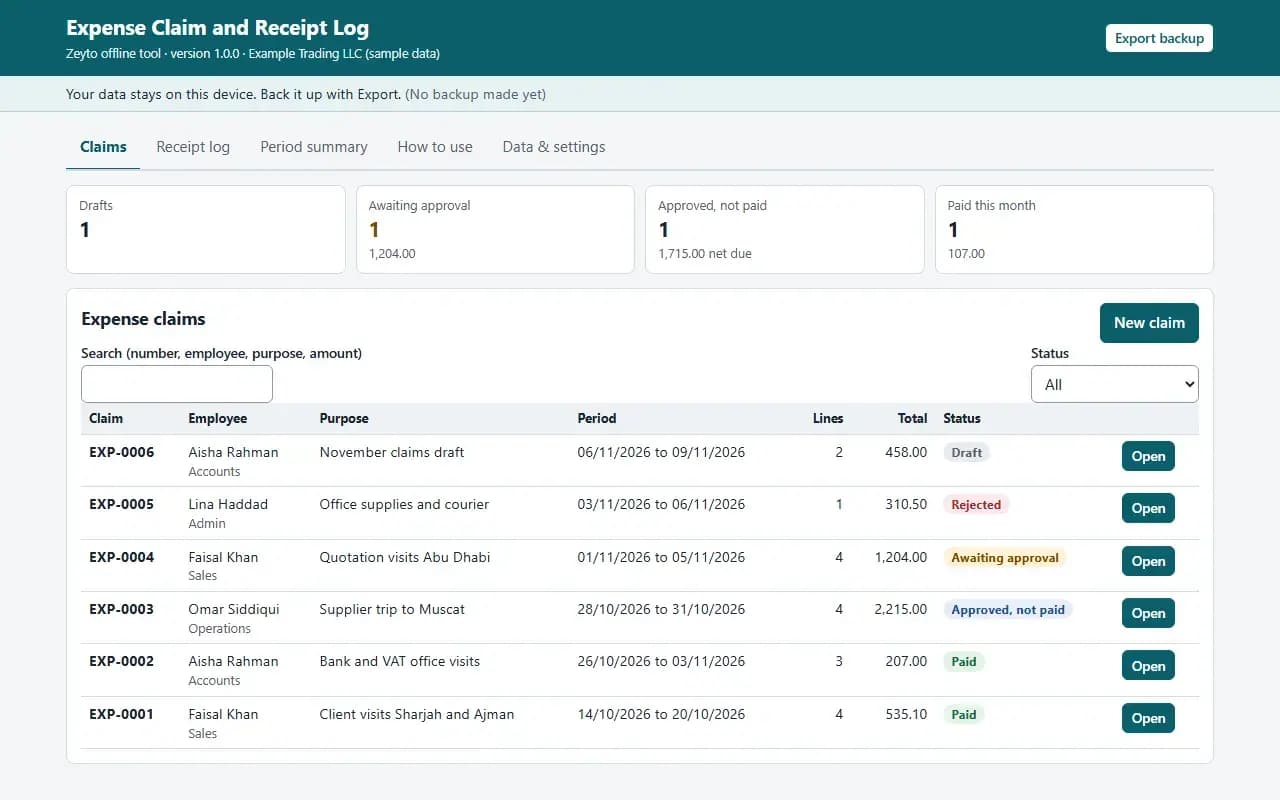
Claims, with the example data
Try it now
Click through the real app. No download, no sign-up.
Demo with fictional example data. Nothing you type is saved. Printing, export and backup are switched off in the demo; the full app has them.
What you get
- Claims with receipt, mileage and per diem lines
- Receipt required above an amount you set, duplicate and cap checks
- Draft, submitted, approved, rejected, paid with a senior approval limit
- Receipt log including lost receipts
- Printable claim form with advance and payable
- Period summary by category and employee with VAT estimate
Files and sizes (2)
- expense-claim-and-receipt-log-offline-app.zip29 KB
- README.txt3.7 KB
2 files, 33 KB in total. You download them from your order page after payment.
What it does not do
- Keep the receipts themselves.
- Check VAT recovery with your tax adviser.
- Your data stays in one browser on one device: no cloud sync, so export a backup.
- Not included: accounting software, and it does not read receipts or store receipt photos.
After you buy
- Instant downloadYour order page opens right after payment with a secure link for each file. The link is emailed to you too.
- A fresh link any timeLinks last 48 hours. Enter your order reference and the email you paid with and we will send a new one.
- Help is one email awayWrite to support@zeyto.app with your order reference. The team answers every enquiry.
- Fix, replace or refundIf a file is damaged, will not open, or is materially different from its listing, tell us within 7 days of the sale and we will fix it, replace it or refund you.
Find my purchasesContact the Zeyto teamMarketplace terms
Full refund wording
Digital downloads (files, templates, skill packs, guides) are delivered straight away, so they are not refunded once downloaded. If a file is damaged, will not open, or is materially different from its listing, tell us within 7 days of the sale and we will fix it, replace it or refund you.
Applies to products sold by Zeyto itself. None of this takes away rights you have under UAE law.
About this product
Read the full description
Expense Claim and Receipt Log is an offline app: one HTML file in a zip that opens by double-click, with no installation, internet or subscription.
The problem it removes: Staff expense claims arrive as WhatsApp photos, a crumpled bundle or a spreadsheet nobody trusts. The same taxi receipt is claimed twice, a meal over the policy limit is paid without anyone noticing, receipts go missing, and the accountant spends a day each month working out what is VAT-recoverable. Nobody can say how much was claimed by whom last quarter.
What is inside:
- A claim per employee and period with lines for receipts, mileage (kilometres at your rate) and per diem days (up to three rates you name)
- Categories with an optional cap per receipt, and a receipt required from an amount you set
- Checks as you type: dates inside the claim period, possible duplicates, over-cap lines, a missing receipt blocks submit
- Workflow: draft, submitted, approved or rejected with a reason, paid; claims above a total you set need a senior approver's name
- A Receipt log of every receipt with its reference and whether it was kept, lost or not required
- VAT estimated only for lines marked as a tax invoice with the supplier's TRN; mileage and per diem carry no VAT
- A printable claim form with the advance paid, the amount payable, the employee declaration and signature lines
- A Period summary by category and by employee, CSV export, example data, JSON backup and restore
In the zip: index.html (the app), README.txt (quick start, how it calculates, limits) and EXAMPLE-DATA with a made-up example you can restore. Start in 10 minutes: open index.html, press Load example data, look around, press Clear everything and enter your own settings.
Rules are settings, not built in. The mileage rate, the three per-diem rates, the receipt threshold, the senior-approval limit, the VAT rate and the categories with caps are settings: the app has no built-in rates because these are your company's policy.
Who it is for: company owners, office managers and finance staff who reimburse staff expenses and want one claim form and one record.
What it is NOT: accounting software, and it does not read receipts or store receipt photos: keep the paper or file and write where it is in the receipt reference. It does not pay anyone, and it does not know UAE company policy or what is tax-deductible: check VAT recovery with your tax adviser. Approval is a record by name, not a login. Petty Cash and Expense Claim Pack is an Excel and Word pack with policy and forms; this is a separate offline app with calculated mileage and per diem, validation and a receipt log. Cash taken from a petty cash box is in Petty Cash Voucher Book.
Your data stays on this device in your browser. Back it up with Export; clearing browser data loses it otherwise.
Verified by us: 92 scripted checks through the real screens in Chromium, run at 1280 px and at 375 px, including recalculation of every stored line amount and the VAT estimate in Python, the claim flags, a draft that is blocked from submit, line validation, a line outside the claim period, senior approval, approve, reject and delete, the receipt log, the period summary against an independent total, settings and CSV export. The claim form and the period summary were rendered to PDF in Chromium and looked at. Not tested in Firefox or Safari (neither could be launched in our test environment), in Edge, on a real phone, on a real printer, or with real bank or accounting exports; layout checked at 375 px and 1280 px.
Questions
Who is it for?
What do I need to use it?
How do I get it?
What if the file is wrong?
Expense Claim and Receipt Log: AED 69
Pay once, download at once.
Damaged, will not open or not as listed? Tell us within 7 days and we fix it, replace it or refund you.
Questions before you buy? Contact the Zeyto team. This is sold by Zeyto (Emeron Infospace FZE) itself, not by an independent seller. See the marketplace terms.
Not sure it is the right one?
Works well with
Other official products that cover the same ground or finish the job.
- Download
Artwork Proof Approval Sheet and Round Log for Print Shops
Offline proof log for a print shop: every proof round with date, channel and outcome, a checklist the customer confirms, and a printable approval sheet with a signature. A job cannot be marked approved or sent to print until the approved round and the checklist are on file.
Also about approval, offline-app, uaeAED 39Instant download - Download
Petty Cash Voucher Book: Numbered Vouchers, Float Top-Up and Cash Count (Offline App)
Offline petty cash book with numbered payment vouchers you print and sign, a float that tops itself up on a clear figure, receipts flagged, cash counts with differences on record and a monthly summary for your accountant. Data stays on your device.
Also about offline-app, uae, expensesAED 49Instant download - Download
Repair Warranty Register and Claim Check
Offline warranty register for a repair shop: expiry dates from your own plans, an in warranty or expired answer by phone or IMEI, a claim log with decisions and costs, and which repair types come back most. Prints a warranty card. Data stays on your device.
Also about claims, offline-app, uaeAED 39Instant download - Download
Driving Student Lesson Package, Fee and Balance Tracker
Offline ledger for a driving school: each student buys lesson packages and fees, every lesson taken is counted, and the app shows lessons left, lessons taken beyond the package, the balance owed, and prints receipts, statements and lesson cards. Data stays on your device.
Also about receipts, offline-app, uaeAED 49Instant download