Offline appOfficial Zeyto
Shop Cash-Up and Till Reconciliation
An offline app for shop owners, supermarket and restaurant managers who close a till every day.
Close every till with a signed difference.
At a glance
- FormatOffline app, opens in your browser
- DeliveryInstant download
- In the box2 files, 30 KB
- Works withA modern browser
- OfflineRuns offline in your browser
- Made forUAE businesses
How it works
- 1BuyPay on Stripe’s secure page.
- 2DownloadYour order page opens at once with a secure link.
- 3Open and useUnzip it and open index.html in your browser.
See it first
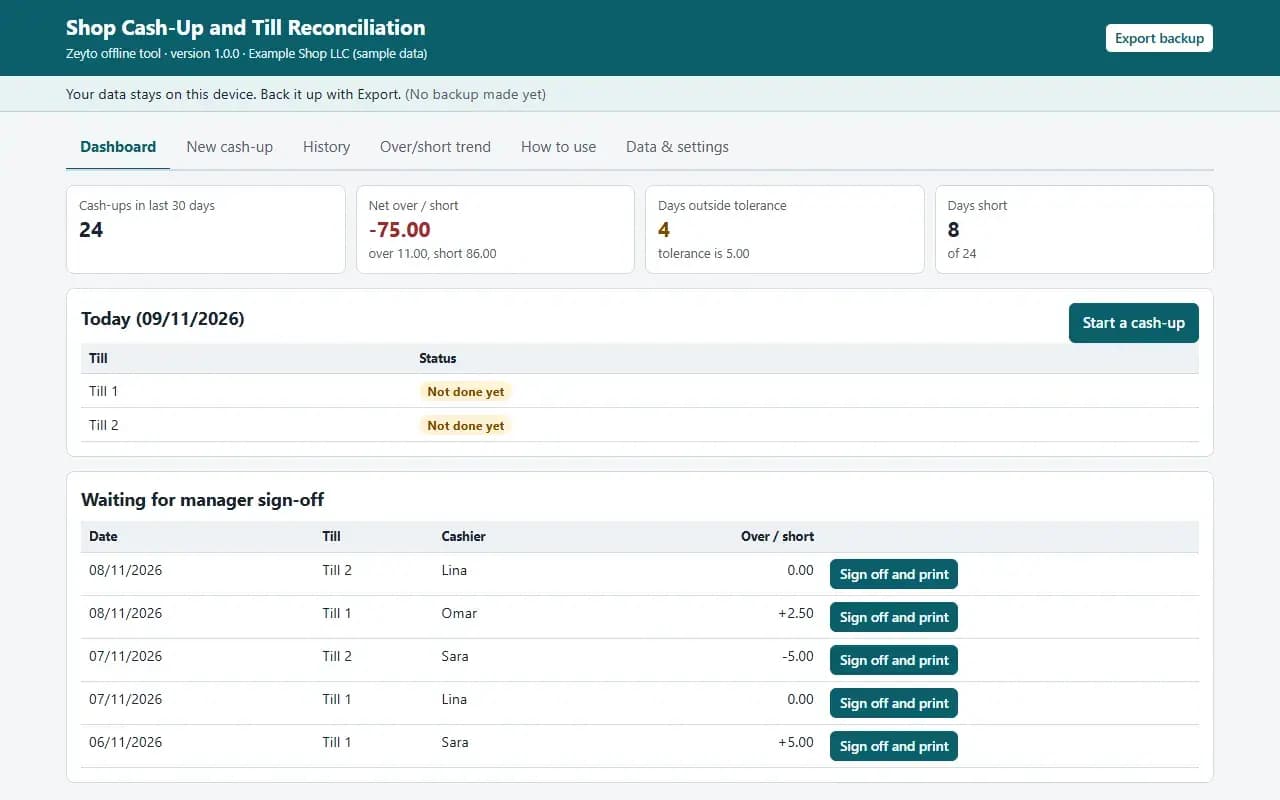
Look before you pay: screenshots, a short walkthrough and a live demo you can click through.
Dashboard, with the example data
Try it now
Click through the real app. No download, no sign-up.
Demo with fictional example data. Nothing you type is saved. Printing, export and backup are switched off in the demo; the full app has them.
What you get
- Cash-up form: POS totals, refunds, paid-outs, cash added
- Denomination count with expected vs counted live
- Card batch and online settlement checks against the POS
- Printable manager sign-off sheet with float and cash to bank
- Over/short trend by till and by cashier
- Example data, CSV export, JSON backup and restore
Files and sizes (2)
- shop-cash-up-and-till-recon-offline-app.zip27 KB
- README.txt3.4 KB
2 files, 30 KB in total. You download them from your order page after payment.
What it does not do
- Type the totals from your POS or Z report.
- A difference is a signal, not proof of who is responsible.
- Your data stays in one browser on one device: no cloud sync, so export a backup.
After you buy
- Instant downloadYour order page opens right after payment with a secure link for each file. The link is emailed to you too.
- A fresh link any timeLinks last 48 hours. Enter your order reference and the email you paid with and we will send a new one.
- Help is one email awayWrite to support@zeyto.app with your order reference. The team answers every enquiry.
- Fix, replace or refundIf a file is damaged, will not open, or is materially different from its listing, tell us within 7 days of the sale and we will fix it, replace it or refund you.
Find my purchasesContact the Zeyto teamMarketplace terms
Full refund wording
Digital downloads (files, templates, skill packs, guides) are delivered straight away, so they are not refunded once downloaded. If a file is damaged, will not open, or is materially different from its listing, tell us within 7 days of the sale and we will fix it, replace it or refund you.
Applies to products sold by Zeyto itself. None of this takes away rights you have under UAE law.
About this product
Read the full description
Shop Cash-Up and Till Reconciliation is an offline app: one HTML file in a zip that opens by double-click, with no installation, internet or subscription.
The problem it removes: At the end of a shift the cashier counts the notes, the manager glances at the Z report, and a difference of a few dirhams is shrugged off. Repeated small shorts at one till or from one person go unnoticed for months, nobody signs anything, and when the owner asks what the shortfall was last month the answer is a guess.
What is inside:
- A New cash-up form per till and shift: POS cash, card, online and other sales, cash refunds, cash paid out of the till and cash added
- A denomination count (notes and coins): expected cash, counted cash and the difference update as you type
- Expected cash = opening float + POS cash sales - cash refunds - cash paid out + cash added
- Card and online takings checked against your machine batch and settlement figures when you enter them
- How much float stays in the till and how much goes to the bank
- A printable sign-off sheet for the cashier and the manager
- History with search and till filter, and an Over/short trend by till and by cashier
- Duplicate guard for the same till on the same day, CSV export, example data, JSON backup and restore
In the zip: index.html (the app), README.txt (quick start, how it calculates, limits) and EXAMPLE-DATA with a made-up example you can restore. Start in 10 minutes: open index.html, press Load example data, look around, press Clear everything and enter your own settings.
Rules are settings, not built in. The tills or shifts, the float you leave and the tolerance for a normal difference are settings. A fresh copy starts with placeholder values: replace them with your own policy.
Who it is for: shop owners, supermarket and restaurant managers and anyone who closes a till every day and wants a signed record.
What it is NOT: a POS and it does not read your POS: you type the totals from your shift or Z report. A difference is a signal, not proof, and the app does not say who is responsible. It does not post to your accounts. Retail Shop Daily Cash-Up and Stock Take Pack is an Excel workbook and forms pack that also covers stock take; this is a separate offline app that is only the daily cash-up, with live differences, sign-off and trend.
Your data stays on this device in your browser. Back it up with Export; clearing browser data loses it otherwise.
Verified by us: 39 scripted checks through the real screens in Chromium, run at 1280 px and at 375 px, including an independent recomputation of expected cash and the difference for every example day, a hand-worked new cash-up, duplicate and validation rules, editing a signed cash-up, deleting, the trend chart and CSV export. The sign-off sheet was rendered to PDF in Chromium and looked at. Not tested in Firefox or Safari (neither could be launched in our test environment), in Edge, on a real phone, on a real printer, or with real bank or accounting exports; layout checked at 375 px and 1280 px.
Questions
Who is it for?
What do I need to use it?
How do I get it?
What if the file is wrong?
Shop Cash-Up and Till Reconciliation: AED 49
Pay once, download at once.
Damaged, will not open or not as listed? Tell us within 7 days and we fix it, replace it or refund you.
Questions before you buy? Contact the Zeyto team. This is sold by Zeyto (Emeron Infospace FZE) itself, not by an independent seller. See the marketplace terms.
Not sure it is the right one?
Works well with
Other official products that cover the same ground or finish the job.
- Download
Petty Cash Voucher Book: Numbered Vouchers, Float Top-Up and Cash Count (Offline App)
Offline petty cash book with numbered payment vouchers you print and sign, a float that tops itself up on a clear figure, receipts flagged, cash counts with differences on record and a monthly summary for your accountant. Data stays on your device.
Also about cash-control, offline-app, uaeAED 49Instant download - Download
Shop Layaway and Reserved-Item Deposit Register
Offline register for items a shop sets aside against a deposit. Each reservation shows paid, balance, shelf location and hold end date. Flags thin deposits, holds ending soon, fully paid items to hand over, and deposits to give back after a cancellation.
Also about retail, offline-app, uaeAED 49Instant download - Download
Shop Staff Sales Target and Incentive Statement
Offline app for shops that pay sales staff an incentive. Enter daily sales and returns for each person, set monthly targets and your own incentive bands, and see achievement, pace and incentive. Print a month statement for each person to sign.
Also about retail, offline-app, uaeAED 49Instant download - Download
Shop Stamp Card and Loyalty Points Register
Offline loyalty register for a small shop. Points or one stamp per visit from each purchase, rewards you define, a check that nobody redeems more than they have, who is ready for a reward, who is close, and who has not been seen for a while. WhatsApp messages are opened for you.
Also about retail, offline-app, uaeAED 49Instant download