Offline appOfficial Zeyto
PRO Office Transaction Tracker with Fee and Charge Split
An offline app for PRO offices and typing and document clearing centres that pay charges for clients and bill later.
Keep government charges apart from your fee.
At a glance
- FormatOffline app, opens in your browser
- DeliveryInstant download
- In the box2 files, 70 KB
- Works withA modern browser: Chrome, Edge, Safari or Firefox
- OfflineRuns offline in your browser
- Made forUAE businesses
How it works
- 1BuyPay on Stripe’s secure page.
- 2DownloadYour order page opens at once with a secure link.
- 3Open and useUnzip it and open index.html in your browser.
See it first
Look before you pay: screenshots, a short walkthrough and a live demo you can click through.
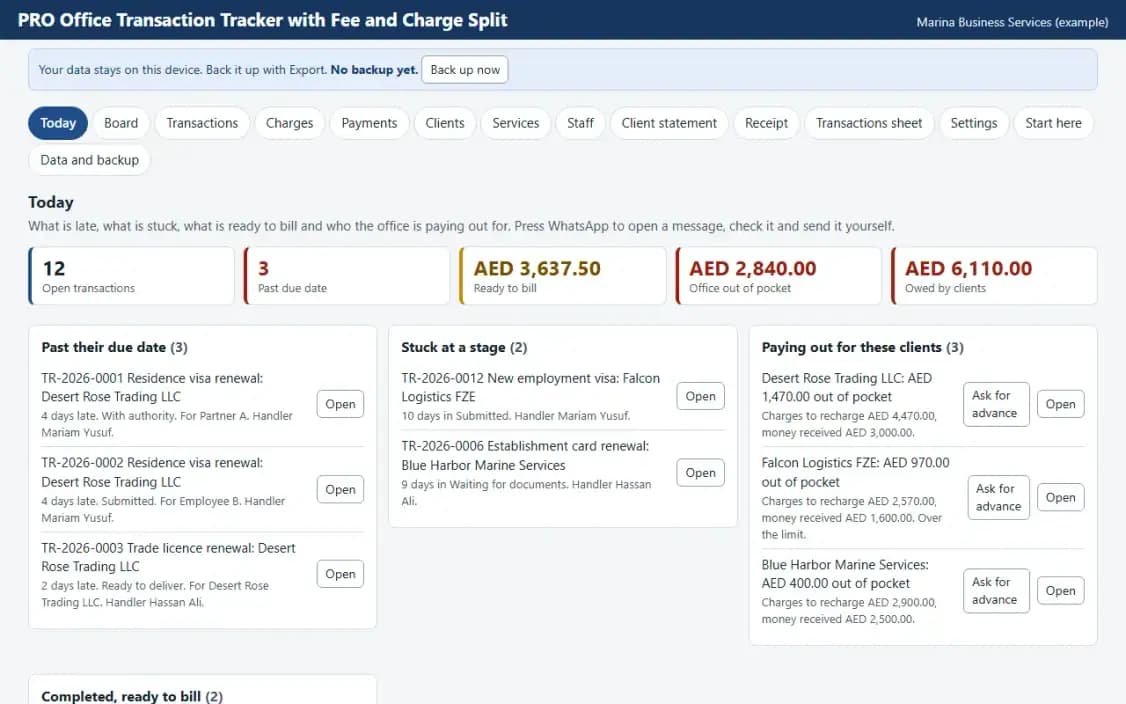
Today, with the example data
Try it now
Click through the real app. No download, no sign-up.
Demo with fictional example data. Nothing you type is saved. Printing, export and backup are switched off in the demo; the full app has them.
What you get
- Transactions with charges and fee kept apart
- Advances and client balance
- Out of pocket by client list
- Work board and client statement print
- Works offline, data stays on your device
Files and sizes (2)
- pro-office-transaction-tracker-with-fee-and-charge-split-uae.zip61 KB
- README.txt8.8 KB
2 files, 70 KB in total. You download them from your order page after payment.
What it does not do
- You enter every charge and fee.
- VAT applies to the fee only, and the statement is not a tax invoice.
- Your data stays in one browser on one device: no cloud sync, so export a backup.
After you buy
- Instant downloadYour order page opens right after payment with a secure link for each file. The link is emailed to you too.
- A fresh link any timeLinks last 48 hours. Enter your order reference and the email you paid with and we will send a new one.
- Help is one email awayWrite to support@zeyto.app with your order reference. The team answers every enquiry.
- Fix, replace or refundIf a file is damaged, will not open, or is materially different from its listing, tell us within 7 days of the sale and we will fix it, replace it or refund you.
Find my purchasesContact the Zeyto teamMarketplace terms
Full refund wording
Digital downloads (files, templates, skill packs, guides) are delivered straight away, so they are not refunded once downloaded. If a file is damaged, will not open, or is materially different from its listing, tell us within 7 days of the sale and we will fix it, replace it or refund you.
Applies to products sold by Zeyto itself. None of this takes away rights you have under UAE law.
About this product
Read the full description
PRO Office Transaction Tracker with Fee and Charge Split is an offline app (one HTML file in a zip) for an office that processes visas, labour papers, licence renewals and attestations for client companies. Each transaction has a stage, a due date and a handler. The money is kept in two parts: charges the office paid for the client, recorded with the receipt number, and the office's service fee. Advances from clients are recorded and the client statement shows charges, fees, VAT at the rate you set, and the balance.
The problem it removes: A PRO office pays government and other charges out of its own cash for many clients, then bills them later together with its own fee. In a notebook or one spreadsheet the pass-through charges and the fee are mixed, nobody knows how much of the office's money is sitting with each client, and a client's advance is spent without a record. This app keeps each transaction's charges and fee apart and shows who the office is paying out for.
What is inside:
- Transactions with a service, a stage, a due date, a handler, a reference you type and an optional fee different from the service default
- Charges paid on behalf of the client, with the kind, receipt number, who paid and whether to recharge it to the client or absorb it
- A catalogue of services with the default service fee for each
- Advances, payments and refunds for each client, with the balance owed or held
- Today page: transactions past due, stuck at a stage, ready to bill, and clients the office is paying out for beyond a limit you set
- Work board by stage, a printable client statement that shows charges and fees apart, and a receipt
- Example data you can load in one click, a Start here guide and an Honest limits panel
- JSON backup and restore, CSV export, and CSV import with a check of every row before anything is added
Who it is for: PRO offices, typing and document clearing centres and corporate services providers in the UAE that pay charges for clients and bill them later with a service fee.
What it is NOT: It does not know any government fee, rule or process: every charge and fee is entered by the user. VAT is a rate you enter and applies only to the service fee. The statement it prints is an administrative statement, not a tax invoice. It does not connect to any government system and does not store scans. It is not legal, tax or accounting advice, it is not connected to any government system, bank or messaging service, and it does not file or send anything by itself. UAE e-invoicing is not part of it.
Your data stays on this device in your browser. Back it up with Export; clearing browser data loses it otherwise.
Verified by us: scripted tests in Chromium (155 checks through the real screens: adding, editing and deleting records in every table, required-field messages, backup then clear then restore, CSV export then import, keyboard order, print layouts rendered to PDF, no horizontal scrolling at 375 and 1280 pixels, no network requests) and an independent recalculation by a separately written Python evaluator of 2107 calculated values (25 randomised rows plus the example data) with 0 mismatches. Not tested: Safari and Firefox beyond what is stated here, and no real printer was used (print layouts were checked as PDF).
Questions
Who is it for?
What do I need to use it?
How do I get it?
What if the file is wrong?
PRO Office Transaction Tracker with Fee and Charge Split: AED 59
Pay once, download at once.
Damaged, will not open or not as listed? Tell us within 7 days and we fix it, replace it or refund you.
Questions before you buy? Contact the Zeyto team. This is sold by Zeyto (Emeron Infospace FZE) itself, not by an independent seller. See the marketplace terms.
Not sure it is the right one?
Works well with
Other official products that cover the same ground or finish the job.
- Download
PRO Office Client Document Expiry Reminder Sheet
Offline expiry sheet for a PRO officer who looks after many client companies. Documents per client with expiry dates, a reminder ladder you set, a log of every reminder sent, the renewal fee quoted, a daily list of who to message and one tap to create the next renewal.
Also about pro-office, offline-app, uaeAED 59Instant download - Download
Client Original Document Receipt and Movement Register
Offline register of clients' original documents. Each original gets a receipt number and a printed receipt, every move to a runner, counter, bank or court is logged with who holds it, and the Today page lists originals out of the safe, past their return date or held too long.
Also about pro-office, offline-app, uaeAED 49Instant download - Download
Law Office Case File Index and Hearing Diary
Offline case file index and hearing diary for a law office. File numbers, clients, court case numbers, the lawyer in charge and where the file is kept, plus one diary of hearings and filing dates with clash checks, adjourned hearings to re-book and files that have no next date.
Also about offline-app, uaeAED 59Instant download - Download
Law Office Time Entry and Disbursement Statement
Offline time and disbursement statement for a law office. Lawyers log minutes against a file at their own hourly rate, costs paid for the client are recorded, and one tap prepares a statement per file with fees, discount, costs, VAT rate you set and payments received on account.
Also about offline-app, uaeAED 59Instant download