Offline appOfficial Zeyto
Label and QR Code Printer for Sticker Sheets
An offline app for warehouse and shop staff, facilities teams and small makers who label bins, cartons and equipment.
Sticker sheets that print on the die cuts.
At a glance
- FormatOffline app, opens in your browser
- DeliveryInstant download
- In the box2 files, 88 KB
- Works withA modern browser: Chrome, Edge, Safari or Firefox
- OfflineRuns offline in your browser
How it works
- 1BuyPay on Stripe’s secure page.
- 2DownloadYour order page opens at once with a secure link.
- 3Open and useUnzip it and open index.html in your browser.
See it first
Look before you pay: screenshots, a short walkthrough and a live demo you can click through.
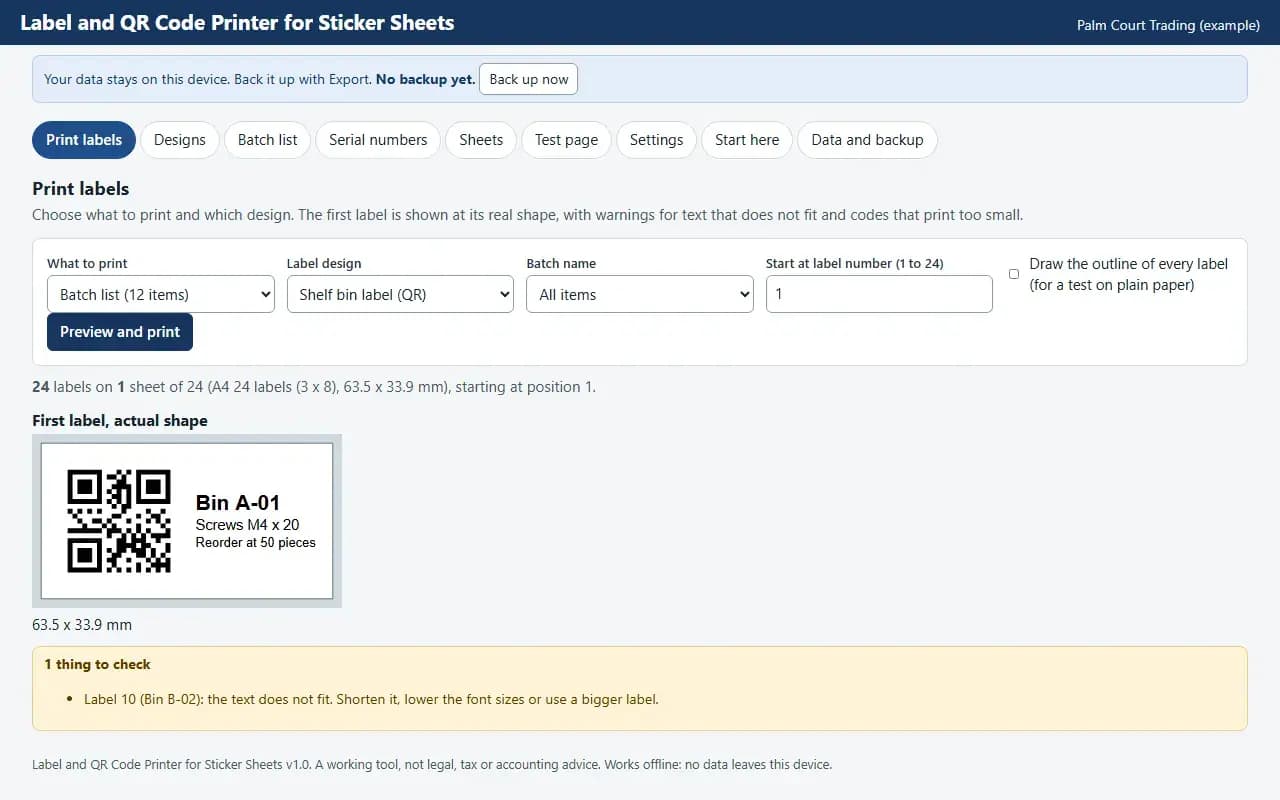
Print labels, with the example data
Try it now
Click through the real app. No download, no sign-up.
Demo with fictional example data. Nothing you type is saved. Printing, export and backup are switched off in the demo; the full app has them.
What you get
- Label designer with QR, Code 128 and EAN-13
- Editable A4 sticker sheet grids
- Serial ranges and CSV batch
- Test page with offset calibration
- PDF at exact size, works offline
Files and sizes (2)
- label-and-qr-code-printer-for-sticker-sheets-uae.zip80 KB
- README.txt8.2 KB
2 files, 88 KB in total. You download them from your order page after payment.
What it does not do
- It does not register or scan barcodes: the EAN-13 number is the one you type.
- Grids are common sizes.
- Your data stays in one browser on one device: no cloud sync, so export a backup.
After you buy
- Instant downloadYour order page opens right after payment with a secure link for each file. The link is emailed to you too.
- A fresh link any timeLinks last 48 hours. Enter your order reference and the email you paid with and we will send a new one.
- Help is one email awayWrite to support@zeyto.app with your order reference. The team answers every enquiry.
- Fix, replace or refundIf a file is damaged, will not open, or is materially different from its listing, tell us within 7 days of the sale and we will fix it, replace it or refund you.
Find my purchasesContact the Zeyto teamMarketplace terms
Full refund wording
Digital downloads (files, templates, skill packs, guides) are delivered straight away, so they are not refunded once downloaded. If a file is damaged, will not open, or is materially different from its listing, tell us within 7 days of the sale and we will fix it, replace it or refund you.
Applies to products sold by Zeyto itself. None of this takes away rights you have under UAE law.
About this product
Read the full description
Label and QR Code Printer for Sticker Sheets is an offline app (one HTML file in a zip) that lays labels out on the sticker sheets you already buy. You describe a label once, with text lines and a QR code or a barcode, fill it from a list or a number range, and print it or save a PDF whose labels sit on the die cuts.
The problem it removes: Shelves, bins, cartons and equipment are labelled by hand, or in a word processor where the grid drifts, numbers repeat and the code is pasted in as a picture. Every sheet size needs its own template, and a small shift in the printer ruins a sheet of expensive stickers. This app keeps the sheet sizes, the label designs and the numbering in one place, with a test page to line the printer up first.
What is inside:
- Label designer: up to four text lines with merge fields, a QR code, Code 128 or EAN-13, placed left, right, top or bottom, with a border and padding
- Eight common A4 sticker sheet grids you can edit, with a check that the grid fits the paper
- Batch list with copies per item, batch names, and CSV import and export
- Serial number ranges with a prefix, padding, step and suffix
- Test page with a 100 mm ruler and offset buttons in 0.1 mm steps to line the print up with your stickers
- Start at any label position to reuse a part-used sheet, and an outline mode for trials on plain paper
- Print through the browser or download a PDF at exact page size
- Example data you can load in one click, a Start here guide and an Honest limits panel
- JSON backup and restore, CSV export, and CSV import with a check of every row before anything is added
Who it is for: warehouse and shop staff, facilities teams, small makers and offices that label bins, cartons, products and equipment and want a QR code or a barcode on each label without a design tool.
What it is NOT: It does not register barcodes: an EAN-13 number is the one you type and the app does not check that it was allocated to you. It does not scan or read codes, has no photo or logo layout, and does not connect to a printer or a stock system. The sheet grids are common sizes, not a promise that any maker's sheet matches. The PDF file holds Latin letters only: Arabic text prints through the browser's own Print and Save as PDF. It is not legal, tax or accounting advice, it is not connected to any government system, bank or messaging service, and it does not file or send anything by itself. UAE e-invoicing is not part of it.
Your data stays on this device in your browser. Back it up with Export; clearing browser data loses it otherwise.
Verified by us: scripted tests in Chromium (129 checks through the real screens: adding, editing and deleting records in every table, required-field messages, backup then clear then restore, CSV export then import, keyboard order, print layouts rendered to PDF, no horizontal scrolling at 375 and 1280 pixels, no network requests) and an independent recalculation by a separately written Python evaluator of 668 calculated values (25 randomised rows plus the example data) with 0 mismatches. Safari engine (WebKit): smoke test passed; Firefox: could not be launched. Not tested: Firefox beyond what is stated here, and no real printer was used (print layouts were checked as PDF).
Questions
Who is it for?
What do I need to use it?
How do I get it?
What if the file is wrong?
Label and QR Code Printer for Sticker Sheets: AED 79
Pay once, download at once.
Damaged, will not open or not as listed? Tell us within 7 days and we fix it, replace it or refund you.
Questions before you buy? Contact the Zeyto team. This is sold by Zeyto (Emeron Infospace FZE) itself, not by an independent seller. See the marketplace terms.
Not sure it is the right one?
Works well with
Other official products that cover the same ground or finish the job.
- Download
Price Tag and Shelf Label Maker with Was and Now Prices
Offline price tag maker: a product list with price, was price, unit price and barcode; shelf, sale and compact tag layouts on editable A4 sticker sheets; a reprint list that flags changed prices; PDF at exact size. Data stays on your device.
Also about stickers, offline-app, barcodeAED 69Instant download - Download
Barcode Generator and Label Sheet: EAN-13, EAN-8, UPC-A, Code 128, Code 39 and ITF (Offline App)
Make scannable barcodes with the check digit added or verified, print them on A4 label sheets or roll labels with your price and name, download single barcodes as SVG or PNG. Built-in encoders, no subscription, works offline.
Also about barcode, labelsAED 69Instant download - Download
QR Payment Link Sheet and Counter Card Maker
Offline sheet maker for payment links you supply: counter cards on A6, A5 or A4, sticker sheets on editable A4 grids, the link printed in words under every QR code, and checks on the links. It does not process payments. Data stays on your device.
Also about qr-code, stickers, offline-appAED 59Instant download - Download
Ingredient and Allergen Label Printer for Food Sellers
Offline label printer for food sellers: ingredients you type, the allergen words you mark shown in bold with a Contains line, made and best before dates, batch codes, a batch log, and editable A4 sticker sheet grids with a test page. Data stays on your device.
Also about stickers, offline-appAED 69Instant download