Offline appOfficial Zeyto
Barcode Generator and Label Sheet
An offline app for small shops, bakeries, workshops and warehouses that label their own products, cartons or bins.
Print your own barcode labels.
At a glance
- FormatOffline app, opens in your browser
- DeliveryInstant download
- In the box2 files, 33 KB
- Works withA current web browser (Chrome, Edge or Safari), on a computer or phone
- OfflineRuns offline in your browser
How it works
- 1BuyPay on Stripe’s secure page.
- 2DownloadYour order page opens at once with a secure link.
- 3Open and useUnzip it and open index.html in your browser.
See it first
Look before you pay: screenshots, a short walkthrough and a live demo you can click through.
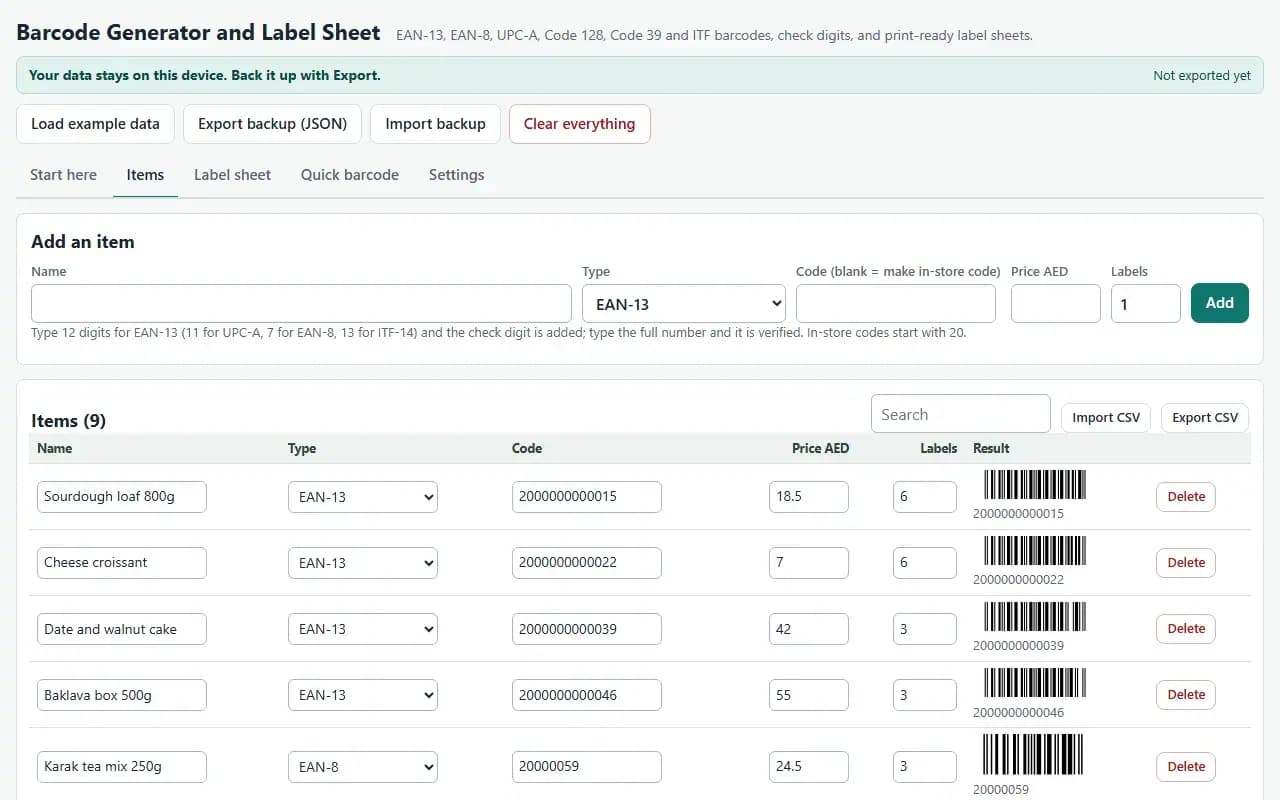
Items, with the example data
Try it now
Click through the real app. No download, no sign-up.
Demo with fictional example data. Nothing you type is saved. Printing, export and backup are switched off in the demo; the full app has them.
What you get
- Items, Label sheet, Quick barcode and Settings tabs
- EAN-13, EAN-8, UPC-A, Code 128, Code 39 (optional check), ITF and ITF-14
- Check digit added, and a wrong typed digit flagged with the right one
- Sheets of 8, 21, 40 or 65 labels, roll labels and a custom grid
- Start at label number, printer offset and a size warning
- SVG and PNG download, CSV import and export, JSON backup
Files and sizes (2)
- barcode-generator-and-label-sheet-app.zip29 KB
- README.txt4.3 KB
2 files, 33 KB in total. You download them from your order page after payment.
What it does not do
- Numbers for products sold in other retailers must come from GS1.
- The app allocates no numbers.
- Your data stays in one browser on one device: no cloud sync, so export a backup.
After you buy
- Instant downloadYour order page opens right after payment with a secure link for each file. The link is emailed to you too.
- A fresh link any timeLinks last 48 hours. Enter your order reference and the email you paid with and we will send a new one.
- Help is one email awayWrite to support@zeyto.app with your order reference. The team answers every enquiry.
- Fix, replace or refundIf a file is damaged, will not open, or is materially different from its listing, tell us within 7 days of the sale and we will fix it, replace it or refund you.
Find my purchasesContact the Zeyto teamMarketplace terms
Full refund wording
Digital downloads (files, templates, skill packs, guides) are delivered straight away, so they are not refunded once downloaded. If a file is damaged, will not open, or is materially different from its listing, tell us within 7 days of the sale and we will fix it, replace it or refund you.
Applies to products sold by Zeyto itself. None of this takes away rights you have under UAE law.
About this product
Read the full description
Shelf and stock labels with barcodes usually mean a monthly subscription, an online tool that sees your product list, or retyping codes into a word processor. This app builds the barcodes inside one file, with no network, from your own item list.
Add each item with a name, barcode type, code, price and the number of labels, or import a CSV. For EAN-13, EAN-8, UPC-A and ITF-14 the app adds the check digit, and if you type a full number with the wrong check digit it tells you the correct one. Leave the code blank and it makes an in-store number starting with 20. On the Label sheet tab pick a layout, preview the page, set the starting label so a partly used sheet can be reused, shift the grid to align your printer, and print at 100 percent scale. The Quick barcode tab makes a single barcode, downloads it as SVG or PNG and includes a check digit calculator.
What is inside:
- Items, Label sheet, Quick barcode, Settings and Start here tabs
- Code 128 with automatic choice of code sets, Code 39 with optional check character, ITF and ITF-14 for cartons
- A4 layouts of 8, 21, 40 and 65 labels per page, 50 x 30 mm roll labels and custom geometry
- Name, business name, price and digits on each label, switchable
- CSV import and export, JSON backup, print or save as PDF
- A worked example of nine bakery items across the main types
Who it is for: small shops, bakeries, workshops and warehouses that label their own products, cartons or bins.
What it is not: EAN and UPC numbers for products sold through other retailers must be allocated to you by GS1 (GS1 UAE in the UAE). Numbers starting 20 to 29 are set aside for in-store use on your own shelves, and this app does not allocate numbers. No QR or other 2D codes, and no GS1-128 application identifiers, in this version. Scan a printed sample with your own scanner and printer before a full run.
How it differs: the Price Tag, Shelf Label and Wobbler Print Sheets in the catalogue are designed tag and label layouts to fill in. This app generates the barcodes themselves.
Tested: 541 barcode strings across all seven types were decoded with an independent open-source reader (ZXing-C++) from rendered images. 537 matched exactly. The other 4 are Code 39 strings that the reader reads under its Code 39 Extended rules (a $, /, + or % pair); the bars were identical to a second encoder library's. Bar patterns matched that library in 333 of 380 comparisons; the other 47 were all Code 128, where the two encoders chose different but valid mixes of code sets (mine were never longer), and every Code 128 symbol decoded correctly. Printed PDFs of the 21, 40 and 65 per page sheets and 29 roll labels were rendered at 300 dpi and every barcode decoded. 60 scripted browser checks cover the tabs, validation, CSV, backup and downloads, with no console errors. Browser tests ran in Chromium and WebKit; Firefox, a real phone, a real printer and a real scanner were not available, so they were not tested.
Questions
Who is it for?
What do I need to use it?
How do I get it?
What if the file is wrong?
Barcode Generator and Label Sheet: AED 69
Pay once, download at once.
Damaged, will not open or not as listed? Tell us within 7 days and we fix it, replace it or refund you.
Questions before you buy? Contact the Zeyto team. This is sold by Zeyto (Emeron Infospace FZE) itself, not by an independent seller. See the marketplace terms.
Not sure it is the right one?
Works well with
Other official products that cover the same ground or finish the job.
- Download
Offline QR Code Generator and Label Sheets: Links, WhatsApp, Wi-Fi, Contacts, Batch from CSV
Make QR codes for links, WhatsApp, contact cards, Wi-Fi and text, one at a time or in a batch from a CSV, and print them on A4 label sheets. The encoder is inside the file, so nothing is uploaded anywhere. Works offline.
Also about labels, offline appAED 69Instant download - Download
Label and QR Code Printer for Sticker Sheets
Offline label designer and printer for A4 sticker sheets: text lines, QR codes, Code 128 and EAN-13 barcodes, batch lists, serial number ranges, editable sheet grids with a test page and offset calibration, and a PDF at exact size. Data stays on your device.
Also about labels, barcodeAED 79Instant download - Download
Compliance and Renewal Calendar Generator: Reminders in Your Phone Calendar (.ics Offline App)
Enter your licence, permit and filing dates once. The app works out every repeat date and writes a calendar file with reminders that you import into Google, Apple or Outlook calendar. Works offline, no subscription.
Also about offline appAED 69Instant download - Download
Material Take-off Calculators with a Costed Quantity Sheet (Offline App)
Eight take-off calculators in one app: concrete, blocks and mortar, tiles, paint, plaster, flooring, skirting and rebar. Every row feeds one quantity sheet by material, with pack sizes, your rates and a total cost. Waste and constants are settings. Offline.
Also about offline appAED 79Instant download