Offline appOfficial Zeyto
Customer Credit Limits and Statements
An offline app for distributors, wholesalers, contractors and service firms that sell on account.
Check the balance before saying yes to credit.
At a glance
- FormatOffline app, opens in your browser
- DeliveryInstant download
- In the box2 files, 33 KB
- Works withA modern browser
- OfflineRuns offline in your browser
- Made forUAE businesses
How it works
- 1BuyPay on Stripe’s secure page.
- 2DownloadYour order page opens at once with a secure link.
- 3Open and useUnzip it and open index.html in your browser.
See it first
Look before you pay: screenshots, a short walkthrough and a live demo you can click through.
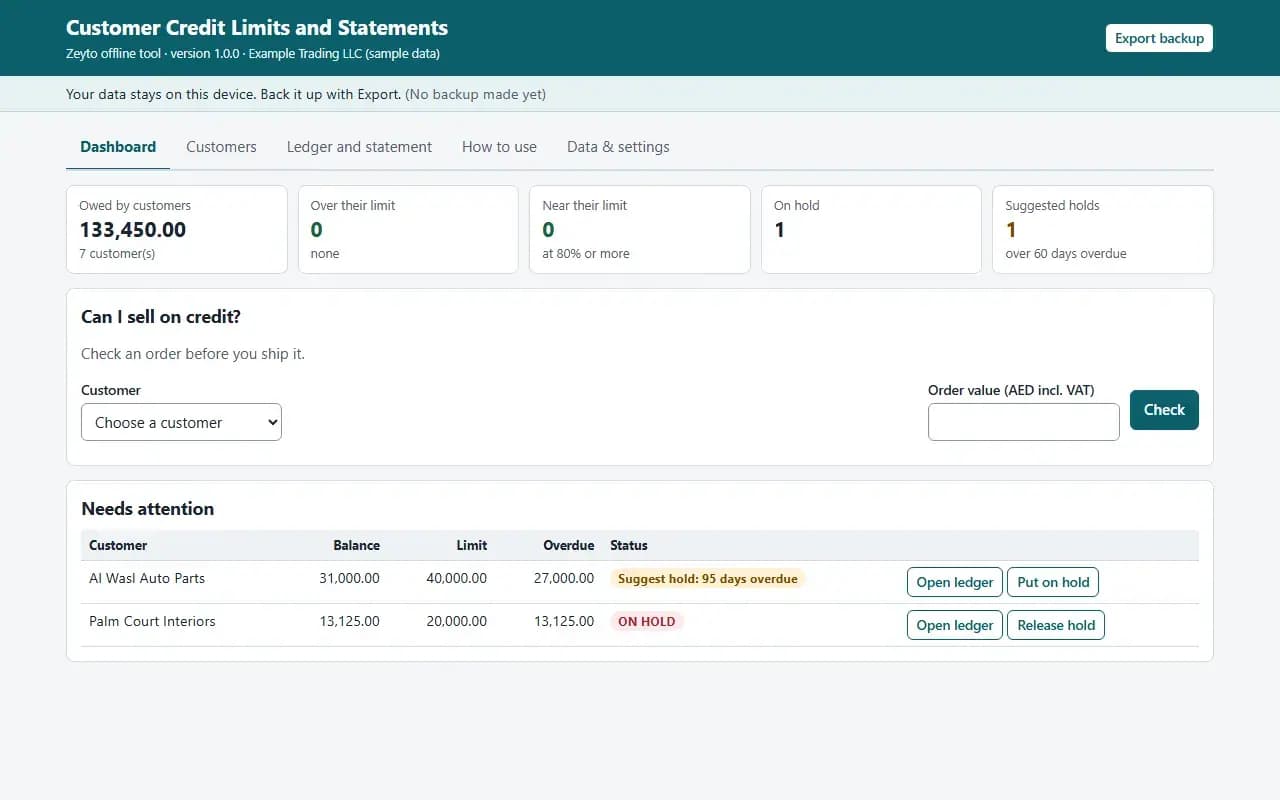
Dashboard, with the example data
Try it now
Click through the real app. No download, no sign-up.
Demo with fictional example data. Nothing you type is saved. Printing, export and backup are switched off in the demo; the full app has them.
What you get
- Credit limit, terms and hold flag per customer
- Can I sell on credit? check before a big order
- Ledger of invoices, payments, credit and debit notes
- Oldest-first ageing and overdue per customer
- Printable statements, one or all customers
- CSV import of customers and transactions, example files
Files and sizes (2)
- customer-credit-limit-and-statement-offline-app.zip29 KB
- README.txt4.3 KB
2 files, 33 KB in total. You download them from your order page after payment.
What it does not do
- Keep entries in step with your books.
- A hold flag reminds staff and does not stop a sale.
- Your data stays in one browser on one device: no cloud sync, so export a backup.
- Not included: accounting software and it does not read your books.
After you buy
- Instant downloadYour order page opens right after payment with a secure link for each file. The link is emailed to you too.
- A fresh link any timeLinks last 48 hours. Enter your order reference and the email you paid with and we will send a new one.
- Help is one email awayWrite to support@zeyto.app with your order reference. The team answers every enquiry.
- Fix, replace or refundIf a file is damaged, will not open, or is materially different from its listing, tell us within 7 days of the sale and we will fix it, replace it or refund you.
Find my purchasesContact the Zeyto teamMarketplace terms
Full refund wording
Digital downloads (files, templates, skill packs, guides) are delivered straight away, so they are not refunded once downloaded. If a file is damaged, will not open, or is materially different from its listing, tell us within 7 days of the sale and we will fix it, replace it or refund you.
Applies to products sold by Zeyto itself. None of this takes away rights you have under UAE law.
About this product
Read the full description
Customer Credit Limits and Statements is an offline app: one HTML file in a zip that opens by double-click, with no installation, internet or subscription.
The problem it removes: Credit is given in the UAE on a handshake and a phone call. The salesman says yes to one more order, nobody checks what the customer already owes or how old it is, and the same customer who is 90 days overdue gets another delivery. When the customer disputes the balance there is no statement to show, only a different figure in each person's head.
What is inside:
- A customer list with a credit limit, payment terms, phone, email and a hold flag with a note
- Can I sell on credit?: enter the customer and the order value and see balance, available credit, overdue amounts and the age of the oldest overdue invoice before you say yes
- A ledger per customer for invoices, payments, credit notes and debit notes; an overpayment sits on account
- Payments and credit notes are applied to the oldest invoices first to work out what is overdue
- Warnings when a percent of the limit you choose is used, and a suggestion to put a customer on hold when the oldest overdue invoice passes the days you choose
- A Needs attention list on the Dashboard: customers over limit, near limit, overdue or on hold
- Printable statement per customer with your payment details, or all statements at once
- CSV import of customers and limits, and of transactions (invoices, payments, credit notes), example files, CSV export, JSON backup and restore
In the zip: index.html (the app), README.txt (quick start, how it calculates, limits) and EXAMPLE-DATA with a made-up example you can restore, plus 2 example CSV files in the layout the importer expects. Start in 10 minutes: open index.html, press Load example data, look around, press Clear everything and enter your own settings.
Rules are settings, not built in. Default payment terms, the percent of the limit that triggers a warning, the overdue days that trigger a hold suggestion, the ageing buckets and the text printed on statements are settings. Limits are your own policy: the app does not decide who deserves credit.
Who it is for: distributors, wholesalers, contractors and service companies that sell on account and want a quick answer before shipping.
What it is NOT: accounting software and it does not read your books: balances are only as good as the entries you import or type. It does not stop a sale: a hold flag is a reminder for sales and warehouse staff. If your customers pay specific invoices the overdue figure can differ from your accounting system because the app applies payments oldest first; treat it as a guide. Receivables ECL Provision Matrix is a finance calculator for provisions; Invoice Chase Desk chases unpaid invoices after the fact; Credit Control and Getting Paid in the UAE is a course. This app is the limit check and the statement.
Your data stays on this device in your browser. Back it up with Export; clearing browser data loses it otherwise.
Verified by us: 49 scripted checks through the real screens in Chromium, at 1280 px and 375 px, with an independent Python recomputation of every customer's balance, available credit and oldest-first overdue, the order check, a limit breach, overpayment, holds, both CSV imports (with and without a type column), settings and backup. The statement was rendered to PDF and looked at. The example CSV files import with no rows skipped and balances match a hand calculation. Not tested in Firefox or Safari (neither could be launched in our test environment), in Edge, on a real phone, on a real printer, or with real bank or accounting exports; layout checked at 375 px and 1280 px.
Questions
Who is it for?
What do I need to use it?
How do I get it?
What if the file is wrong?
Customer Credit Limits and Statements: AED 69
Pay once, download at once.
Damaged, will not open or not as listed? Tell us within 7 days and we fix it, replace it or refund you.
Questions before you buy? Contact the Zeyto team. This is sold by Zeyto (Emeron Infospace FZE) itself, not by an independent seller. See the marketplace terms.
Not sure it is the right one?
Works well with
Other official products that cover the same ground or finish the job.
- Download
Invoice Chase Desk: Ageing, Promise-to-Pay Log and Ready WhatsApp Reminders (Offline App)
Offline app that ages your unpaid invoices, lists who to chase today, writes the WhatsApp or email reminder, logs promises and prints customer statements. Import your open invoices from CSV. Double-click to open, data stays on your device.
Also about receivables, collections, offline-appAED 69Instant download - Download
Instalment and Payment Plan Tracker: Schedules, Receipts, Chase List and Expected Collections (Offline App)
Offline app for customers who pay in instalments: builds the schedule from price, deposit and number of instalments, applies each payment to the oldest instalment, prints numbered receipts, lists who is late with a ready reminder and forecasts the next 12 weeks of collections.
Also about collections, offline-app, uaeAED 69Instant download - Download
UAE Cash, Collections and Payments Offline Apps Bundle: 10 Working Tools
Ten offline apps in one zip: post-dated cheque register, invoice chase desk, petty cash book, till cash-up, credit limits and statements, supplier payment planner, bank reconciler, expense claims, multi-currency pricing and instalment tracker. AED 391 less than buying separately.
Also about collections, offline-app, uaeAED 299Instant download - Download
Clinic Daily Takings and Doctor Share Statements
Offline takings sheet for clinics that pay doctors a percentage: daily entries by doctor, kind of work and payment method, lab fee deductions, refunds and pending insurance, each doctor's own share rates, advances, and a printable monthly share statement.
Also about statements, offline-app, uaeAED 49Instant download