Offline appOfficial Zeyto
Invoice Chase Desk
An offline app for owners, sales administrators and accounts staff of businesses that invoice on credit.
Chase unpaid invoices on a weekly routine.
At a glance
- FormatOffline app, opens in your browser
- DeliveryInstant download
- In the box2 files, 34 KB
- Works withA modern browser
- OfflineRuns offline in your browser
- Made forUAE businesses
How it works
- 1BuyPay on Stripe’s secure page.
- 2DownloadYour order page opens at once with a secure link.
- 3Open and useUnzip it and open index.html in your browser.
See it first
Look before you pay: screenshots, a short walkthrough and a live demo you can click through.
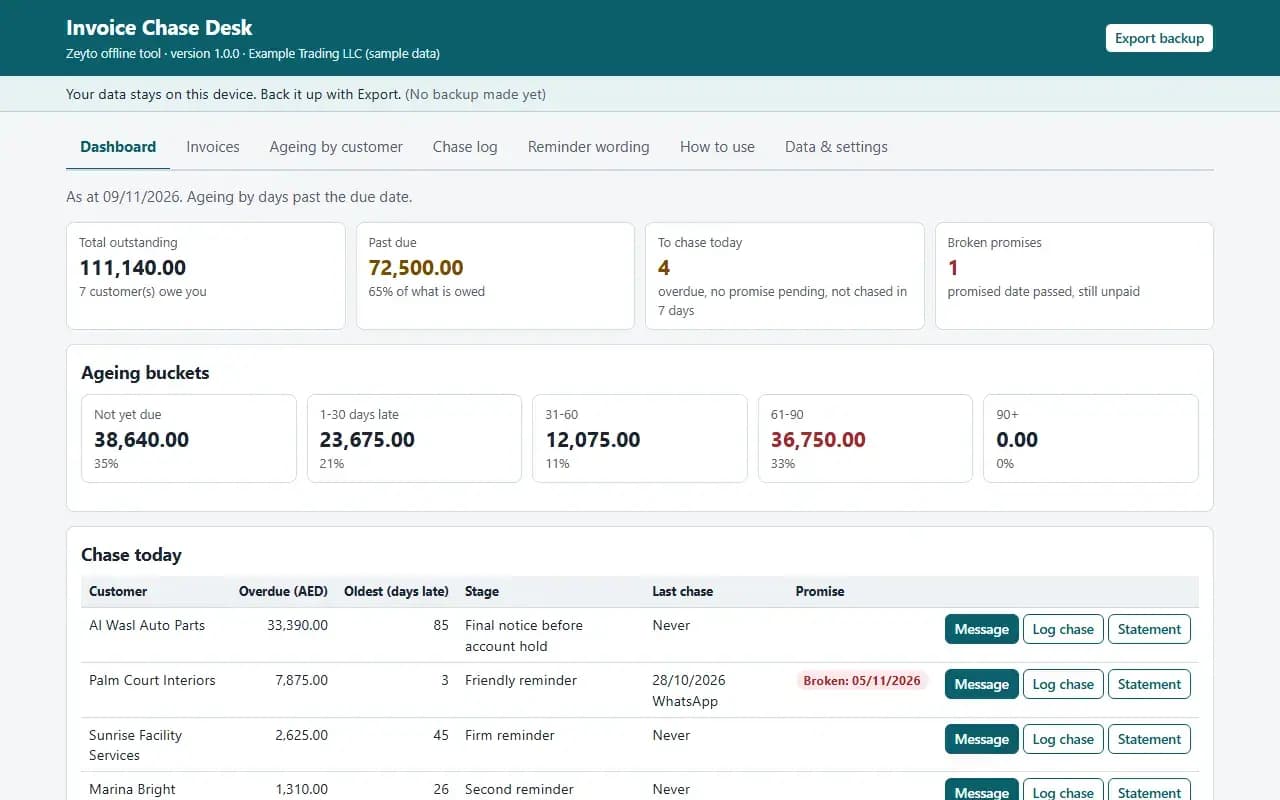
Dashboard, with the example data
Try it now
Click through the real app. No download, no sign-up.
Demo with fictional example data. Nothing you type is saved. Printing, export and backup are switched off in the demo; the full app has them.
What you get
- CSV import of open invoices with column mapping
- Chase today list: overdue, no promise pending, not chased lately
- Reminder wording for WhatsApp and email, editable
- Chase log with promise date and amount, broken promises flagged
- Ageing by customer and printable statements
- Example data and example CSV file, JSON backup and restore
Files and sizes (2)
- invoice-chase-desk-offline-app.zip30 KB
- README.txt3.9 KB
2 files, 34 KB in total. You download them from your order page after payment.
What it does not do
- Keep balances in step with your accounts.
- It sends no messages and gives no legal advice.
- Your data stays in one browser on one device: no cloud sync, so export a backup.
- Not included: accounting software and it does not read your books: the balances are what you import or type.
After you buy
- Instant downloadYour order page opens right after payment with a secure link for each file. The link is emailed to you too.
- A fresh link any timeLinks last 48 hours. Enter your order reference and the email you paid with and we will send a new one.
- Help is one email awayWrite to info@emeron.io with your order reference. The team answers every enquiry.
- Fix, replace or refundIf a file is damaged, will not open, or is materially different from its listing, tell us within 7 days of the sale and we will fix it, replace it or refund you.
Find my purchasesContact the Zeyto teamMarketplace terms
Full refund wording
Digital downloads (files, templates, skill packs, guides) are delivered straight away, so they are not refunded once downloaded. If a file is damaged, will not open, or is materially different from its listing, tell us within 7 days of the sale and we will fix it, replace it or refund you.
Applies to products sold by Zeyto itself. None of this takes away rights you have under UAE law.
About this product
Read the full description
Invoice Chase Desk is an offline app: one HTML file in a zip that opens by double-click, with no installation, internet or subscription.
The problem it removes: Most small UAE businesses chase invoices from memory: someone remembers a customer owes money, sends a message when they have time, and nobody knows who was already chased last week or who promised to pay on the fifteenth. Promises are forgotten, polite customers get chased three times and slow payers not at all, and the money you are owed sits a month longer than it should.
What is inside:
- Import your unpaid invoices from a CSV export (customer, invoice number, dates, outstanding amount, optional phone and email), with a column-mapping step; importing again updates the amount of invoices already there
- A Chase today list: customers who are overdue, have no promise pending and have not been chased inside the number of days you set, biggest overdue first
- Reminder wording for WhatsApp and email with the customer name, invoices and amounts filled in, chosen by how late the oldest invoice is; you edit the wording and copy it. The app does not send anything
- A chase log: how you chased, what happened, the promised date and amount; a broken promise shows in red on the dashboard
- Ageing by customer in buckets you define, counted from the due date or from the invoice date
- Printable statement per customer, or all customers at once
- Record payments against an invoice, add invoices by hand, CSV export of invoices and the chase log
- Example data and an example open-invoices CSV, JSON backup and restore, Clear everything
In the zip: index.html (the app), README.txt (quick start, how it calculates, limits) and EXAMPLE-DATA with a made-up example you can restore, plus 1 example CSV file in the layout the importer expects. Start in 10 minutes: open index.html, press Load example data, look around, press Clear everything and enter your own settings.
Rules are settings, not built in. Bucket limits, the number of days before the same customer is chased again, the default payment terms used for imports without a due date and the reminder wording are all settings. The reminder wording is a starting point, not legal advice.
Who it is for: owners, sales administrators and accounts staff of businesses that invoice on credit and want a simple, repeatable weekly chase routine.
What it is NOT: accounting software and it does not read your books: the balances are what you import or type, so keep them in step with your accounts. It does not send messages, and it is not legal advice on threatening action or reporting a debtor. Receivables Ageing and Chase Tracker is an Excel workbook; this is a separate offline app with CSV import, a chase list driven by rules, promise tracking and ready message wording. It does not set credit limits: Customer Credit Limits and Statements does that.
Your data stays on this device in your browser. Back it up with Export; clearing browser data loses it otherwise.
Verified by us: 58 scripted checks through the real screens in Chromium, run at 1280 px and at 375 px, with an independent Python calculation of the ageing buckets and the chase list compared with what the app shows, plus a CSV import with semicolons, month-name dates and deliberately bad rows (skipped with reasons). The statement was rendered to PDF in Chromium and looked at. The example CSV shipped in the zip was imported through the real Import screen with no rows skipped. Not tested in Firefox or Safari (neither could be launched in our test environment), in Edge, on a real phone, on a real printer, or with real bank or accounting exports; layout checked at 375 px and 1280 px.
Questions
Who is it for?
What do I need to use it?
How do I get it?
What if the file is wrong?
Invoice Chase Desk: AED 69
Pay once, download at once.
Damaged, will not open or not as listed? Tell us within 7 days and we fix it, replace it or refund you.
Questions before you buy? Contact the Zeyto team. This is sold by Zeyto (Emeron Infospace FZE) itself, not by an independent seller. See the marketplace terms.
Not sure it is the right one?
Works well with
Other official products that cover the same ground or finish the job.
- Download
Customer Credit Limits and Statements: Can I Sell on Credit? Ledger, Ageing and Statements (Offline App)
Offline app that holds a credit limit and terms per customer, checks before a big order whether you can sell on credit, ages balances oldest-first and prints customer statements. Import customers and transactions from CSV. Data stays on your device.
Also about receivables, offline-app, uaeAED 69Instant download - Download
Instalment and Payment Plan Tracker: Schedules, Receipts, Chase List and Expected Collections (Offline App)
Offline app for customers who pay in instalments: builds the schedule from price, deposit and number of instalments, applies each payment to the oldest instalment, prints numbered receipts, lists who is late with a ready reminder and forecasts the next 12 weeks of collections.
Also about collections, offline-app, uaeAED 69Instant download - Download
Invoice Chaser: UAE payment reminders in English and Arabic
Pick the right step and tone for each overdue invoice, then get the email, WhatsApp, call script, dispute reply and payment plan drafted. You review and send.
Also about receivables, uae, whatsappAED 140Instant download - Download
Receivables Ageing and Chase Tracker
Track unpaid sales invoices in Excel: ageing buckets, chase stages, next action dates, a chase log and reminder wording, so you know who to call today. Includes a sample CSV.
Also about receivables, ageing, collectionsAED 69Instant download