Offline appOfficial Zeyto
Stock Count, Variance and Shrinkage
An offline app for cafes, restaurants, groceries and shops with up to a few hundred items counted monthly or weekly.
Count stock and see the gap in dirhams.
At a glance
- FormatOffline app, opens in your browser
- DeliveryInstant download
- In the box2 files, 29 KB
- Works withA current web browser (Chrome, Edge or Safari), on a computer or phone
- OfflineRuns offline in your browser
How it works
- 1BuyPay on Stripe’s secure page.
- 2DownloadYour order page opens at once with a secure link.
- 3Open and useUnzip it and open index.html in your browser.
See it first
Look before you pay: screenshots, a short walkthrough and a live demo you can click through.
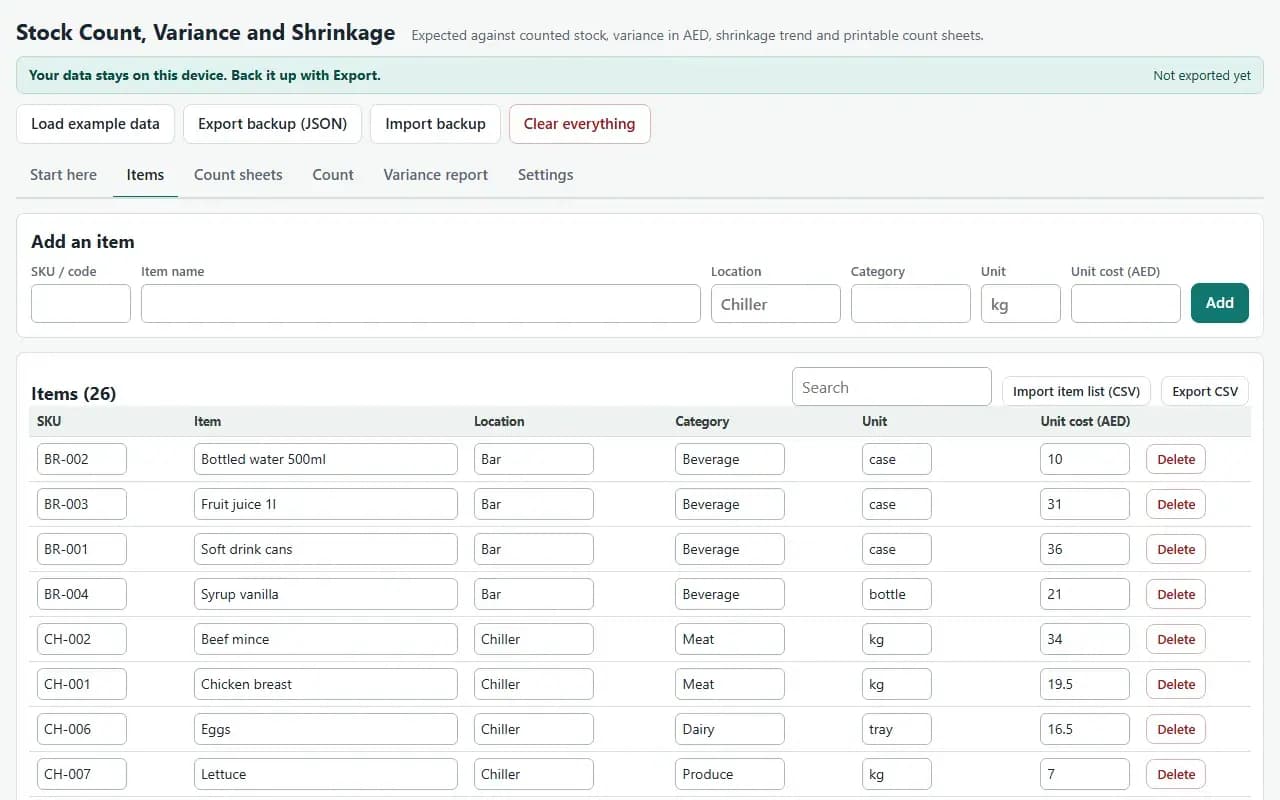
Items, with the example data
Try it now
Click through the real app. No download, no sign-up.
Demo with fictional example data. Nothing you type is saved. Printing, export and backup are switched off in the demo; the full app has them.
What you get
- Items, Count sheets, Count, Variance report and Settings tabs
- Blind A4 count sheets by location
- Expected = opening + receipts - usage, valued at the count-time cost
- Variance in AED and percent with your own tolerances and a trend
- CSV import of items and counted quantities, CSV export, JSON backup
- Worked example: three monthly counts of a cafe store with 26 items
Files and sizes (2)
- stock-count-variance-and-shrinkage-app.zip25 KB
- README.txt3.6 KB
2 files, 29 KB in total. You download them from your order page after payment.
What it does not do
- Recount flagged lines before acting.
- A variance is a signal, not proof, and it posts nothing to your books.
- Your data stays in one browser on one device: no cloud sync, so export a backup.
- Not included: a variance is a signal, not proof of loss, because unrecorded usage.
After you buy
- Instant downloadYour order page opens right after payment with a secure link for each file. The link is emailed to you too.
- A fresh link any timeLinks last 48 hours. Enter your order reference and the email you paid with and we will send a new one.
- Help is one email awayWrite to support@zeyto.app with your order reference. The team answers every enquiry.
- Fix, replace or refundIf a file is damaged, will not open, or is materially different from its listing, tell us within 7 days of the sale and we will fix it, replace it or refund you.
Find my purchasesContact the Zeyto teamMarketplace terms
Full refund wording
Digital downloads (files, templates, skill packs, guides) are delivered straight away, so they are not refunded once downloaded. If a file is damaged, will not open, or is materially different from its listing, tell us within 7 days of the sale and we will fix it, replace it or refund you.
Applies to products sold by Zeyto itself. None of this takes away rights you have under UAE law.
About this product
Read the full description
Stock goes missing in small amounts: waste nobody logged, wrong portions, deliveries not checked, theft. You only see it by comparing what the books say should be on the shelf with what is really there, and most small businesses count, shrug at the total and never see which items drift.
Add your items with a location, unit and unit cost, or import them from CSV. Print blind count sheets by location so counters write what they see, not what the system says. Start a count session: the opening stock comes from the previous count, you enter receipts and usage since then, and then the counted quantity for each item (typed, or imported from CSV by SKU for counts taken on a phone or scanner). The variance report shows expected against counted, the money difference, shrinkage as a percentage of usage, lines outside your tolerance in percent or dirhams, and the trend across your counts.
What is inside:
- Items, Count sheets, Count, Variance report, Settings and Start here tabs
- Blind and expected-quantity count sheet options, printable per location
- Several count sessions kept side by side, with the previous count carried forward
- CSV import (items, counted quantities), CSV export of the variance report, JSON backup, print
- A worked example of three monthly counts for a small cafe store
Who it is for: cafes, restaurants, groceries and shops with up to a few hundred items who count monthly or weekly.
What it is not: a variance is a signal, not proof of loss, because unrecorded usage, wrong units and a miscount look the same, so recount flagged lines before acting. It does not post to your books and is not a stock valuation for tax or audit.
How it differs: the Stock Count Sheets and Reorder Planner and the Retail Daily Cash-Up and Stock-Take Pack in the catalogue are Excel files. This app keeps a history of count sessions, carries the opening stock forward, takes counted quantities from CSV and shows the trend and the money lost by item and location.
Tested: expected, variance, shrinkage percent and valuation were compared with a separate Python implementation on randomised count histories, 6,902 values, with no differences. 16 scripted browser checks cover the example, sessions, CSV import, backup restore, print and the 375 and 1280 pixel layouts, with no console errors. Browser tests ran in Chromium and WebKit; Firefox, a real phone, a real printer and a real scanner were not available, so they were not tested.
Questions
Who is it for?
What do I need to use it?
How do I get it?
What if the file is wrong?
Stock Count, Variance and Shrinkage: AED 69
Pay once, download at once.
Damaged, will not open or not as listed? Tell us within 7 days and we fix it, replace it or refund you.
Questions before you buy? Contact the Zeyto team. This is sold by Zeyto (Emeron Infospace FZE) itself, not by an independent seller. See the marketplace terms.
Not sure it is the right one?
Works well with
Other official products that cover the same ground or finish the job.
- Download
Stock Count Sheets and Reorder Planner
For a business that holds stock: ABC classes, reorder points and suggested order quantities, blind count sheets to print, and a count variance report. Up to 300 items in Excel, with a sample CSV.
Also about inventory, stock countAED 109Instant download - Download
Cafe and Restaurant Kitchen Apps Bundle: Recipe Costing, Stock Count, Wastage, Supplier Prices and Daily Close-Out
5 offline apps for UAE cafes, shops and kitchens in one zip. Separately AED 335, bundled AED 139. Each opens by double-click and keeps your data on your device.
Also about cafe, offline appAED 139Instant download - Download
Expiry Date and FEFO Batch Tracker: What to Use, Mark Down or Write Off (Offline App for Food and Retail)
Keep every batch with its lot and expiry date, see what is expired, use now or expiring soon and the money in each group, and issue stock first expired first out. One click writes off expired batches. Works offline in your browser.
Also about inventory, offline appAED 69Instant download - Download
Recipe Costing and Menu Engineering: True Dish Cost, Selling Price and Menu Classes (Offline App)
Turn supplier prices into the real cost of every dish and the price that reaches your food cost target. Your sales mix sorts the menu into stars, plough horses, puzzles and dogs. Prints A4 recipe cards. Works offline in your browser.
Also about cafe, offline appAED 79Instant download