Offline appOfficial Zeyto
QR Menu Maker with Table Cards
An offline app for cafes, small restaurants, food stalls and home kitchens that already host a menu page online.
Change a menu price once, reprint in minutes.
At a glance
- FormatOffline app, opens in your browser
- DeliveryInstant download
- In the box2 files, 85 KB
- Works withA modern browser: Chrome, Edge, Safari or Firefox
- OfflineRuns offline in your browser
How it works
- 1BuyPay on Stripe’s secure page.
- 2DownloadYour order page opens at once with a secure link.
- 3Open and useUnzip it and open index.html in your browser.
See it first
Look before you pay: screenshots, a short walkthrough and a live demo you can click through.
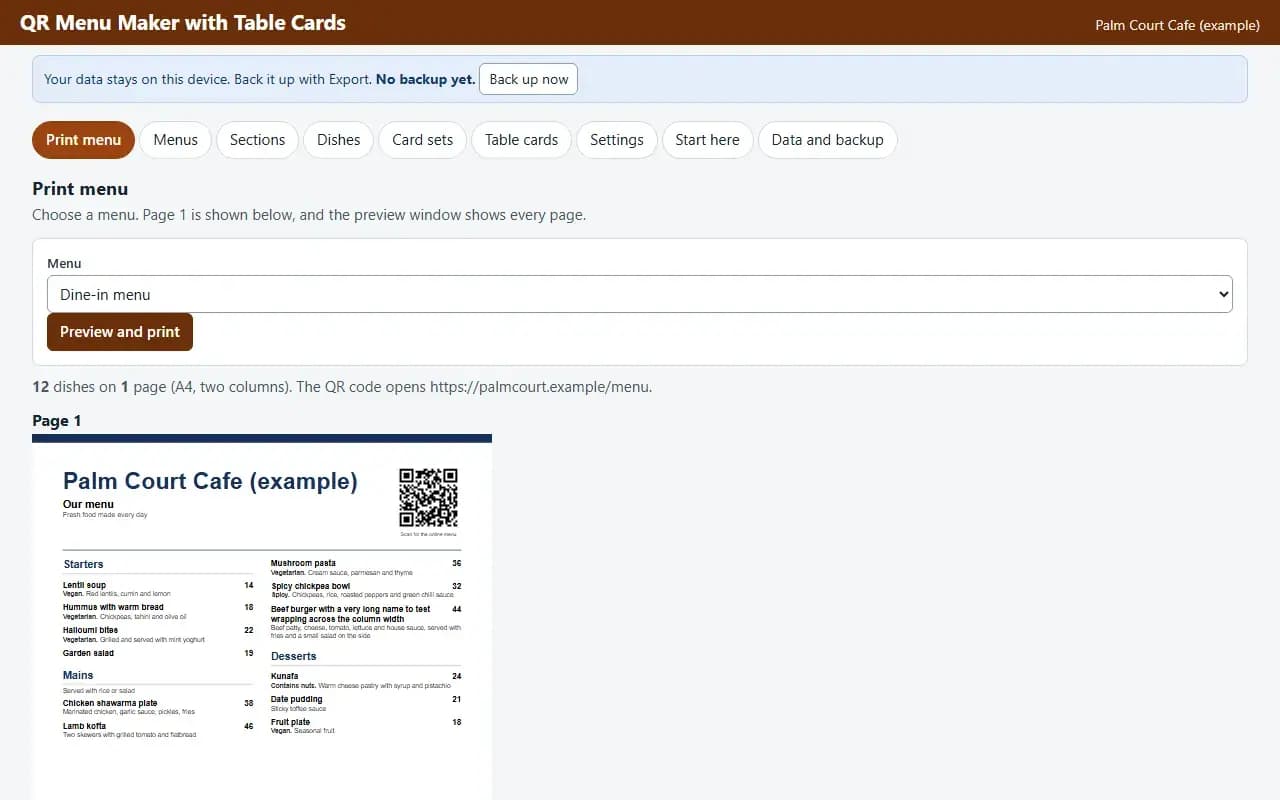
Print menu, with the example data
Try it now
Click through the real app. No download, no sign-up.
Demo with fictional example data. Nothing you type is saved. Printing, export and backup are switched off in the demo; the full app has them.
What you get
- Menu maker with sections and dishes
- A4 and A5 printable menu
- Table cards and poster with QR code
- Table number range
- PDF at exact size, works offline
Files and sizes (2)
- qr-menu-maker-with-table-cards-uae.zip79 KB
- README.txt6.3 KB
2 files, 85 KB in total. You download them from your order page after payment.
What it does not do
- You host the menu online: the QR opens the link you type.
- Allergen marks are only what you choose to print.
- Your data stays in one browser on one device: no cloud sync, so export a backup.
After you buy
- Instant downloadYour order page opens right after payment with a secure link for each file. The link is emailed to you too.
- A fresh link any timeLinks last 48 hours. Enter your order reference and the email you paid with and we will send a new one.
- Help is one email awayWrite to support@zeyto.app with your order reference. The team answers every enquiry.
- Fix, replace or refundIf a file is damaged, will not open, or is materially different from its listing, tell us within 7 days of the sale and we will fix it, replace it or refund you.
Find my purchasesContact the Zeyto teamMarketplace terms
Full refund wording
Digital downloads (files, templates, skill packs, guides) are delivered straight away, so they are not refunded once downloaded. If a file is damaged, will not open, or is materially different from its listing, tell us within 7 days of the sale and we will fix it, replace it or refund you.
Applies to products sold by Zeyto itself. None of this takes away rights you have under UAE law.
About this product
Read the full description
QR Menu Maker with Table Cards is an offline app (one HTML file in a zip). You type your menu sections, dishes and prices, choose one or two columns and a colour, and print the menu or save a PDF. For the QR side, you type the address of an online menu you already have, and the app prints table cards and posters with a QR code that opens it, with the table number if you want one.
The problem it removes: Menus live in a word processor that shifts when a price changes, sold out dishes stay on the printed page, and table QR codes are pasted in from a website one at a time. Here the menu is a list, the price change is one edit, a dish marked not available drops off the print, and the table cards are numbered in one go.
What is inside:
- Menus with sections, dishes, descriptions, prices and your own marks such as Vegetarian or Spicy
- Printable menu on A4 or A5, one or two columns, four colours, with a QR code in the header
- Dishes marked not available are left off the print without deleting them
- Table cards on A6 (four per sheet), A5 (two per sheet) or an A4 poster, with a table number range
- Optional table number added to the link, for a menu page that reads it
- The link printed under the QR code so guests can see where it goes
- Print through the browser or download a PDF at exact page size
- Example data you can load in one click, a Start here guide and an Honest limits panel
- JSON backup and restore, CSV export, and CSV import with a check of every row before anything is added
Who it is for: cafes, small restaurants, food stalls and home kitchens that print their own menus and want QR table cards pointing at a menu page they already host.
What it is NOT: It does not host a menu, take orders or payments, or show your menu online: the QR code opens the link you type, and that link must already work. It does not check any allergen or ingredient information: the marks such as Vegetarian or Contains nuts are only what you choose to print. The PDF file holds Latin letters only: Arabic dish names print through the browser's own Print and Save as PDF. It is not legal, tax or accounting advice, it is not connected to any government system, bank or messaging service, and it does not file or send anything by itself. UAE e-invoicing is not part of it.
Your data stays on this device in your browser. Back it up with Export; clearing browser data loses it otherwise.
Verified by us: scripted tests in Chromium (130 checks through the real screens: adding, editing and deleting records in every table, required-field messages, backup then clear then restore, CSV export then import, keyboard order, print layouts rendered to PDF, no horizontal scrolling at 375 and 1280 pixels, no network requests) and an independent recalculation by a separately written Python evaluator of 115 calculated values (25 randomised rows plus the example data) with 0 mismatches. Safari engine (WebKit): smoke test passed; Firefox: could not be launched. Not tested: Firefox beyond what is stated here, and no real printer was used (print layouts were checked as PDF).
Questions
Who is it for?
What do I need to use it?
How do I get it?
What if the file is wrong?
QR Menu Maker with Table Cards: AED 59
Pay once, download at once.
Damaged, will not open or not as listed? Tell us within 7 days and we fix it, replace it or refund you.
Questions before you buy? Contact the Zeyto team. This is sold by Zeyto (Emeron Infospace FZE) itself, not by an independent seller. See the marketplace terms.
Not sure it is the right one?
Works well with
Other official products that cover the same ground or finish the job.
- Download
Restaurant and Cafe Food Cost and Menu Pricing Workbook
An Excel workbook that costs every recipe from your ingredient prices and yields, sets menu prices from a target food cost, classifies dishes with a menu engineering matrix and checks delivery app margins. Includes a filled-in cafe example.
Also about restaurant, cafe, menuAED 149Instant download - Download
Recipe Costing and Menu Engineering: True Dish Cost, Selling Price and Menu Classes (Offline App)
Turn supplier prices into the real cost of every dish and the price that reaches your food cost target. Your sales mix sorts the menu into stars, plough horses, puzzles and dogs. Prints A4 recipe cards. Works offline in your browser.
Also about restaurant, cafeAED 79Instant download - Download
Menu Design Pack: Restaurant, Cafe and Takeaway Menus in 5 Styles (A4, A3, A5, DL)
Five designed menu styles for a restaurant, cafe or takeaway: A4 menu, A3 cafe board and a DL and A5 takeaway flyer with front and back. Edit in PowerPoint or Word, or send the print-ready PDFs to a printer. Sample dishes in AED.
Also about restaurant, cafeAED 99Instant download - Download
QR Payment Link Sheet and Counter Card Maker
Offline sheet maker for payment links you supply: counter cards on A6, A5 or A4, sticker sheets on editable A4 grids, the link printed in words under every QR code, and checks on the links. It does not process payments. Data stays on your device.
Also about qr-code, offline-appAED 59Instant download