Offline appOfficial Zeyto
Goods Received
An offline app for cafes, restaurants, groceries and shops that receive from several suppliers and want claim evidence.
Check every delivery against the order.
At a glance
- FormatOffline app, opens in your browser
- DeliveryInstant download
- In the box2 files, 30 KB
- Works withA current web browser (Chrome, Edge or Safari), on a computer or phone
- OfflineRuns offline in your browser
How it works
- 1BuyPay on Stripe’s secure page.
- 2DownloadYour order page opens at once with a secure link.
- 3Open and useUnzip it and open index.html in your browser.
See it first
Look before you pay: screenshots, a short walkthrough and a live demo you can click through.
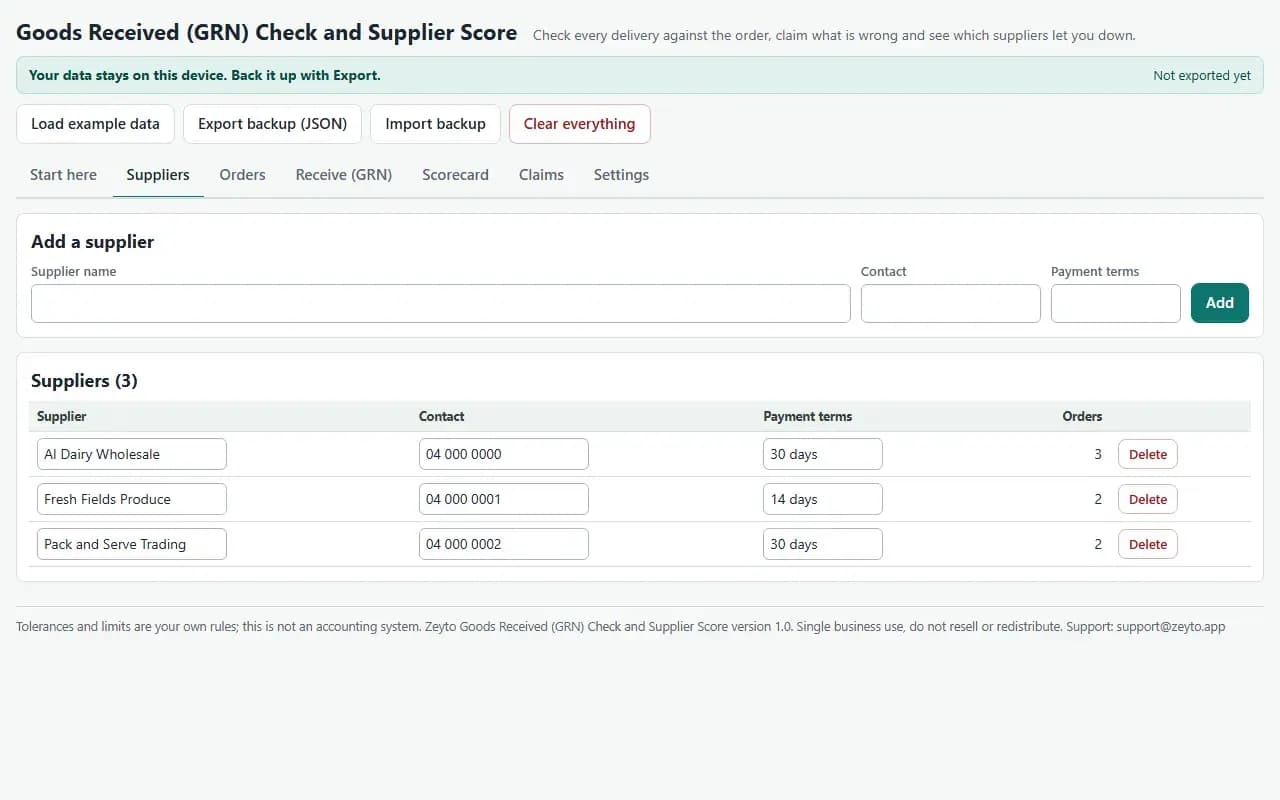
Suppliers, with the example data
Try it now
Click through the real app. No download, no sign-up.
Demo with fictional example data. Nothing you type is saved. Printing, export and backup are switched off in the demo; the full app has them.
What you get
- Suppliers, Orders, Receive (GRN), Scorecard, Claims and Settings tabs
- Received, rejected and reason per line, invoice price against order price
- Partial deliveries: earlier accepted quantity is deducted from what is due
- Shortage, over-delivery, price difference, lateness and temperature flags
- Claim amount per GRN and a printable claims list
- Scorecard with on-time, in-full, price accuracy, quality and your weights
Files and sizes (2)
- goods-received-grn-check-and-supplier-score-app.zip26 KB
- README.txt4.1 KB
2 files, 30 KB in total. You download them from your order page after payment.
What it does not do
- Set tolerances and temperature limits to match your supplier agreements.
- No books or invoices are posted.
- Your data stays in one browser on one device: no cloud sync, so export a backup.
- It is a receiving check and a scoreboard, not an accounting or tax system.
After you buy
- Instant downloadYour order page opens right after payment with a secure link for each file. The link is emailed to you too.
- A fresh link any timeLinks last 48 hours. Enter your order reference and the email you paid with and we will send a new one.
- Help is one email awayWrite to support@zeyto.app with your order reference. The team answers every enquiry.
- Fix, replace or refundIf a file is damaged, will not open, or is materially different from its listing, tell us within 7 days of the sale and we will fix it, replace it or refund you.
Find my purchasesContact the Zeyto teamMarketplace terms
Full refund wording
Digital downloads (files, templates, skill packs, guides) are delivered straight away, so they are not refunded once downloaded. If a file is damaged, will not open, or is materially different from its listing, tell us within 7 days of the sale and we will fix it, replace it or refund you.
Applies to products sold by Zeyto itself. None of this takes away rights you have under UAE law.
About this product
Read the full description
A delivery arrives, someone signs the driver's note, and weeks later the invoice does not match what was ordered or what came off the truck. Without a record made at the door, every shortage, damaged case and price difference is an argument you cannot win, and the supplier who keeps getting it wrong looks the same as the one who does not.
Record each purchase order with its promised date and priced lines. When the delivery arrives, start a goods received note from the order, enter received and rejected quantities with a reason, the invoice price and, if you check it, the temperature, then post it. The app flags shortages, over-delivery, price differences and late delivery against the tolerances you set, works out the claim (rejected units at invoice price plus the overcharge on accepted units), and for partial deliveries deducts what you already accepted so the next GRN expects only the outstanding quantity. The Scorecard ranks suppliers for any date range on on-time, in-full, price accuracy and quality, with weights you choose. Claims lists every rejected or overcharged line, ready to send to the supplier as a credit-note request.
What is inside:
- Suppliers, Orders, Receive (GRN), Scorecard, Claims, Settings and Start here tabs
- Settings for lateness grace days, quantity tolerance, price tolerance, maximum temperature and score weights
- Printable GRN, supplier scorecard and claim request, CSV export, JSON backup
- A worked example: three suppliers, seven orders and seven GRNs
Who it is for: cafes, restaurants, groceries and shops that receive from several suppliers and want evidence for claims.
What it is not: it is a receiving check and a scoreboard, not an accounting or tax system. It does not post to your books, issue tax invoices or credit notes or check VAT. Tolerances and the temperature limit are your own rules; set them to match your supplier agreements and the requirements for your products, which this app does not state. What is payable on a claim is set by your agreement with the supplier.
How it differs: the Restaurant Daily Operations Pack has a simple Excel receiving log. This app matches deliveries to orders, handles partial deliveries and builds a supplier scorecard and claims.
Tested: outstanding quantities, shortages, over-delivery, price differences, claim amounts, on-time and in-full flags, scorecards and order status were compared with a separate Python implementation on randomised orders and GRNs, 12,907 values, with no differences. 74 scripted browser checks cover the example, partial deliveries, validation, posting and reopening, backup restore, print and the 375 and 1280 pixel layouts, with no console errors. Browser tests ran in Chromium and WebKit; Firefox, a real phone, a real printer and a real scanner were not available, so they were not tested.
Questions
Who is it for?
What do I need to use it?
How do I get it?
What if the file is wrong?
Goods Received: AED 69
Pay once, download at once.
Damaged, will not open or not as listed? Tell us within 7 days and we fix it, replace it or refund you.
Questions before you buy? Contact the Zeyto team. This is sold by Zeyto (Emeron Infospace FZE) itself, not by an independent seller. See the marketplace terms.
Not sure it is the right one?
Works well with
Other official products that cover the same ground or finish the job.
- Download
Supplier Order Sheet by Par Level, with Delivery Check and Short Supply Claims
Offline supplier ordering for a kitchen or small shop: par levels and counts give the quantity to order per supplier, with minimum order checks. At delivery you enter received, rejected and invoice figures and see the claim value per supplier. Data stays on your device.
Also about receivingAED 59Instant download - Download
Supplier Price Comparison and Price Change Tracker (Offline App for Food and Retail Buyers)
Put every supplier quote on one footing per kg, litre or piece with VAT treated the same way, see the cheapest supplier per item, and get a flag and a monthly dirham impact whenever a price rises. Works offline in your browser.
Also about offline appAED 69Instant download - Download
Recipe Costing and Menu Engineering: True Dish Cost, Selling Price and Menu Classes (Offline App)
Turn supplier prices into the real cost of every dish and the price that reaches your food cost target. Your sales mix sorts the menu into stars, plough horses, puzzles and dogs. Prints A4 recipe cards. Works offline in your browser.
Also about offline appAED 79Instant download - Download
Restaurant and Cafe Daily Sales Close-Out Report: Average Check, Cash Over or Short, Labour and Food Cost (Offline App)
Type the day figures from your POS report and till count and get average check, payment mix, cash over or short, and labour and food cost as a percent of sales. Keeps every day, shows trends and prints the close report. Works offline.
Also about offline appAED 69Instant download