Offline appOfficial Zeyto
Freelance Project Budget Tracker
An offline app for freelance designers, developers, writers, photographers and consultants running several projects.
Know what each project has really paid you.
At a glance
- FormatOffline app, opens in your browser
- DeliveryInstant download
- In the box2 files, 72 KB
- Works withA modern browser: Chrome, Edge, Safari or Firefox
- OfflineRuns offline in your browser
- Made forUAE businesses
How it works
- 1BuyPay on Stripe’s secure page.
- 2DownloadYour order page opens at once with a secure link.
- 3Open and useUnzip it and open index.html in your browser.
See it first
Look before you pay: screenshots, a short walkthrough and a live demo you can click through.
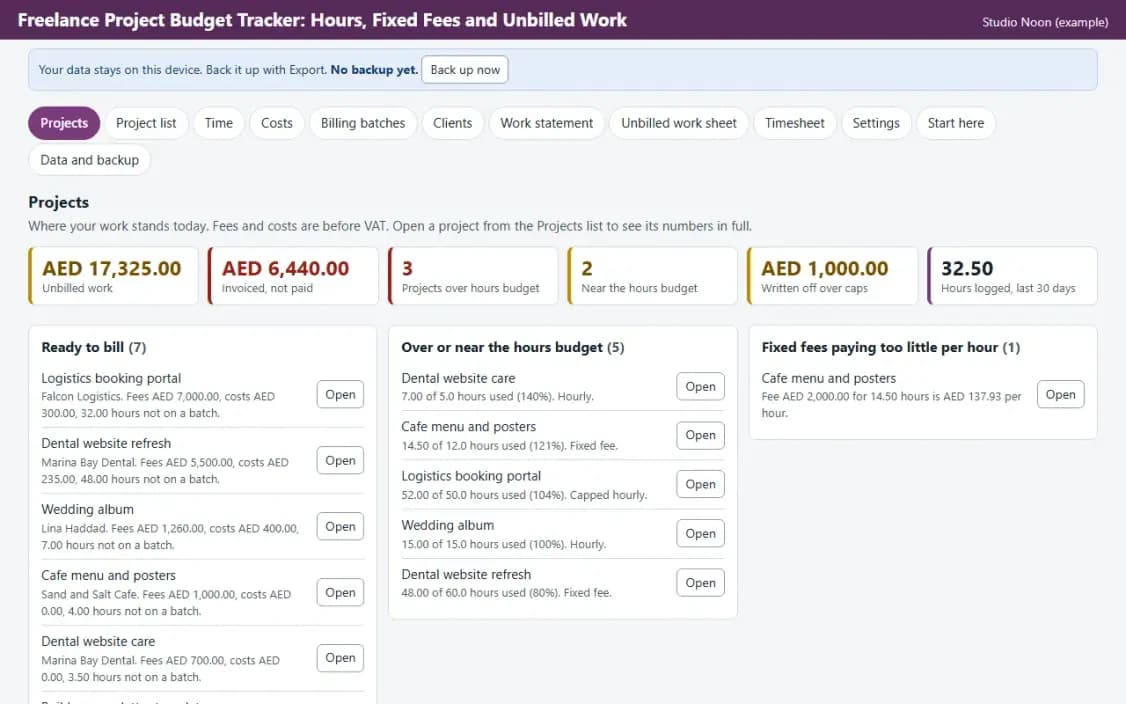
Projects, with the example data
Try it now
Click through the real app. No download, no sign-up.
Demo with fictional example data. Nothing you type is saved. Printing, export and backup are switched off in the demo; the full app has them.
What you get
- Hours against budget per project
- Fixed fee effective rate and capped write-off
- Billing batches and work statement
- Unbilled work sheet per project
- Works offline, data stays on your device
Files and sizes (2)
- freelance-project-budget-hours-and-unbilled-work-uae.zip61 KB
- README.txt10 KB
2 files, 72 KB in total. You download them from your order page after payment.
What it does not do
- Issue the invoice in your own tool and type its number here.
- Amounts are before VAT.
- Your data stays in one browser on one device: no cloud sync, so export a backup.
- It does not create invoices with tax lines, take payments or send messages.
After you buy
- Instant downloadYour order page opens right after payment with a secure link for each file. The link is emailed to you too.
- A fresh link any timeLinks last 48 hours. Enter your order reference and the email you paid with and we will send a new one.
- Help is one email awayWrite to support@zeyto.app with your order reference. The team answers every enquiry.
- Fix, replace or refundIf a file is damaged, will not open, or is materially different from its listing, tell us within 7 days of the sale and we will fix it, replace it or refund you.
Find my purchasesContact the Zeyto teamMarketplace terms
Full refund wording
Digital downloads (files, templates, skill packs, guides) are delivered straight away, so they are not refunded once downloaded. If a file is damaged, will not open, or is materially different from its listing, tell us within 7 days of the sale and we will fix it, replace it or refund you.
Applies to products sold by Zeyto itself. None of this takes away rights you have under UAE law.
About this product
Read the full description
Freelance Project Budget Tracker is an offline app (one HTML file in a zip) for a freelancer or small studio that works on several projects: some by the hour, some for a fixed fee, some by the hour up to a cap. You log hours and out-of-pocket costs against the project. The app shows how much of the hours budget is used, what a fixed fee works out to per hour, how much is capped and written off, and what is still unbilled. When you invoice, you group the work into a billing batch and print a work statement. It is not an invoicing tool: you issue the invoice in your own invoicing tool and type its number here.
The problem it removes: Hours are logged against a project but nobody compares them with the budget, a fixed fee quietly pays less per hour than you thought, a cap swallows the last twelve hours, recharged costs are forgotten, and the invoice is made from memory. This app keeps one running answer to: how much work is done, how much is billed, and what is left to bill.
What is inside:
- Projects page: unbilled fees and costs per project, hours against budget, effective hourly rate on fixed fees, and amount written off over a cap
- Three billing types: hourly, fixed fee, and capped hourly with a cap in AED
- Time log with a billable tick, and recharge costs such as stock photos or printing that can be billed on
- Billing batches: tick time and costs to a batch, then print a work statement that lists exactly what was billed
- Fixed fee instalments that cannot add up to more than the fee, and a warning when work is ticked to the batch of another project
- Warnings: near or over the hours budget, below the lowest hourly rate you accept, finished project with work still unbilled
- Work statement to attach to the invoice, and an unbilled work sheet per project
- Example data you can load in one click, a Start here guide and an Honest limits panel
- JSON backup and restore, CSV export, and CSV import with a check of every row before anything is added
Who it is for: freelance designers, developers, writers, photographers and consultants who run three to ten projects at a time, some by the hour and some for a fixed price, and invoice from their own invoicing tool.
What it is NOT: It does not create invoices with tax lines, take payments or send messages. Amounts are before VAT: enter and add VAT in your invoicing tool. It does not run a timer, so you type hours after the work. It is not advice on what to charge: the rates and warnings are numbers you enter. It is not legal, tax or accounting advice, it is not connected to any government system, bank or messaging service, and it does not file or send anything by itself. UAE e-invoicing is not part of it.
Your data stays on this device in your browser. Back it up with Export; clearing browser data loses it otherwise.
Verified by us: scripted tests in Chromium (166 checks through the real screens: adding, editing and deleting records in every table, required-field messages, backup then clear then restore, CSV export then import, keyboard order, print layouts rendered to PDF, no horizontal scrolling at 375 and 1280 pixels, no network requests) and an independent recalculation by a separately written Python evaluator of 2128 calculated values (25 randomised rows plus the example data) with 0 mismatches. Safari engine (WebKit): smoke test passed; Firefox: could not be launched. Not tested: Firefox beyond what is stated here, and no real printer was used (print layouts were checked as PDF).
Questions
Who is it for?
What do I need to use it?
How do I get it?
What if the file is wrong?
Freelance Project Budget Tracker: AED 49
Pay once, download at once.
Damaged, will not open or not as listed? Tell us within 7 days and we fix it, replace it or refund you.
Questions before you buy? Contact the Zeyto team. This is sold by Zeyto (Emeron Infospace FZE) itself, not by an independent seller. See the marketplace terms.
Not sure it is the right one?
Works well with
Other official products that cover the same ground or finish the job.
- Download
Freelancer Quote, Invoice and Time Tracker
Offline quote, invoice and time tracker for freelancers and small consultancies: log hours, price quotes, turn work into invoices, record payments, see unbilled time and overdue invoices, and message clients on WhatsApp. Data stays on your device.
Also about freelancer, time-tracking, offline-appAED 99Instant download - Download
Client Retainer Tracker: Monthly Billing, Included Hours and Extra Hours
Offline tracker for retainer clients: one billing row per retainer per month, hours used against the hours included, extra hours charged at your rate, months that were never billed, invoices unpaid and overdue, and a printable monthly retainer invoice. Data stays on your device.
Also about freelancer, offline-app, uaeAED 49Instant download - Download
Bookkeeping Monthly Work Board and Fee Billing
Offline work board for a bookkeeping practice. One job per client per month moves from Waiting for documents to Delivered. Each job carries hours, fee, extras and invoice and payment status, and the app shows the fee earned per hour for each client.
Also about billing, offline-app, uaeAED 59Instant download - Download
UAE Accounting Calculators: Fixed Assets, IFRS 16 Leases, ECL Provision and Accruals
Four offline accounting calculators in one download: a fixed asset depreciation register, an IFRS 16 lease calculator, a receivables ECL provision matrix and an accruals, prepayments and deferred income schedule. Cheaper than buying them one by one.
Also about offline-app, uaeAED 119Instant download