Offline appOfficial Zeyto
Bank vs Ledger CSV Reconciler
An offline app for accountants, bookkeepers and owners who reconcile one account a month from a bank CSV.
Reconcile the bank without ticking by eye.
At a glance
- FormatOffline app, opens in your browser
- DeliveryInstant download
- In the box2 files, 36 KB
- Works withA modern browser
- OfflineRuns offline in your browser
- Made forUAE businesses
How it works
- 1BuyPay on Stripe’s secure page.
- 2DownloadYour order page opens at once with a secure link.
- 3Open and useUnzip it and open index.html in your browser.
See it first
Look before you pay: screenshots, a short walkthrough and a live demo you can click through.
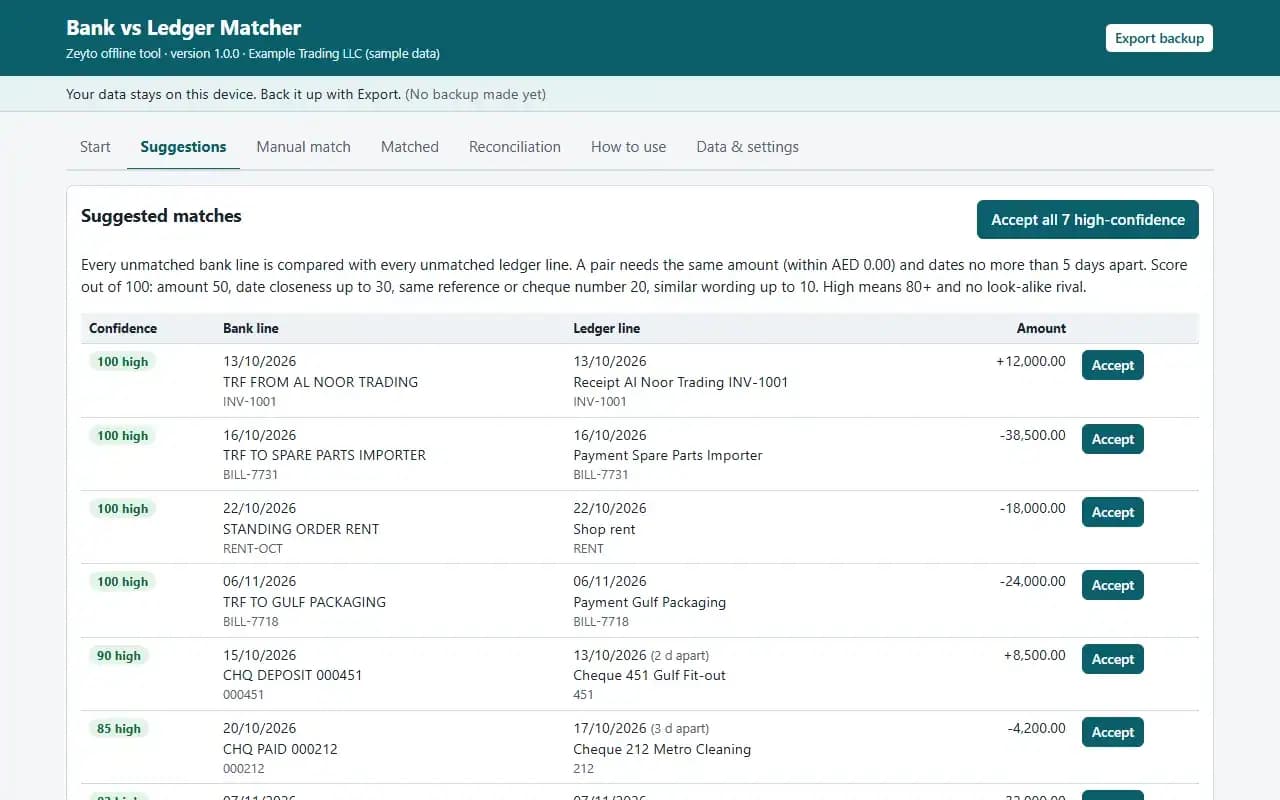
Suggestions, with the example data
Try it now
Click through the real app. No download, no sign-up.
Demo with fictional example data. Nothing you type is saved. Printing, export and backup are switched off in the demo; the full app has them.
What you get
- Imports bank statement and ledger CSV with column mapping
- Scored pair suggestions with one-click accept for sure matches
- Grouped matches: one deposit against several ledger lines
- Manual match with the difference shown
- Printable reconciliation statement with unmatched items
- Example files and a worked example
Files and sizes (2)
- bank-vs-ledger-csv-matcher-offline-app.zip30 KB
- README.txt5.2 KB
2 files, 36 KB in total. You download them from your order page after payment.
What it does not do
- Read each pair before accepting it.
- It posts nothing to your books and handles one account at a time.
- Your data stays in one browser on one device: no cloud sync, so export a backup.
- Not included: a bank connection (you download the CSV yourself), and it posts nothing to your books.
After you buy
- Instant downloadYour order page opens right after payment with a secure link for each file. The link is emailed to you too.
- A fresh link any timeLinks last 48 hours. Enter your order reference and the email you paid with and we will send a new one.
- Help is one email awayWrite to support@zeyto.app with your order reference. The team answers every enquiry.
- Fix, replace or refundIf a file is damaged, will not open, or is materially different from its listing, tell us within 7 days of the sale and we will fix it, replace it or refund you.
Find my purchasesContact the Zeyto teamMarketplace terms
Full refund wording
Digital downloads (files, templates, skill packs, guides) are delivered straight away, so they are not refunded once downloaded. If a file is damaged, will not open, or is materially different from its listing, tell us within 7 days of the sale and we will fix it, replace it or refund you.
Applies to products sold by Zeyto itself. None of this takes away rights you have under UAE law.
About this product
Read the full description
Bank vs Ledger CSV Reconciler is an offline app: one HTML file in a zip that opens by double-click, with no installation, internet or subscription.
The problem it removes: Bank reconciliation is the job that gets left until the auditor asks. Someone ticks lines between a statement and a cash book by eye, a cheque that cleared three days late looks missing, two cash receipts banked as one deposit never agree, and the difference is carried forward month after month. Every unmatched line is a possible error or a missing entry that nobody has looked at.
What is inside:
- Import the bank statement CSV and your ledger (cash book) CSV for the same period; you map the columns, with one signed Amount column or separate Debit and Credit columns, and a sign option
- Re-importing the same file skips lines that are already there
- Every possible pair is scored on amount, date, reference or cheque number and matching words; the sure pairs are accepted in one click and the doubtful ones go to a Check these list
- Grouped matches: one bank deposit against two to four ledger lines when their amounts add up, with a warning if another combination also fits
- Manual match: tick lines on both sides and the difference must be zero
- A Matched tab where any match can be undone
- A bank reconciliation statement: from the bank balance (plus deposits in transit, less cheques not cleared) and from your books (plus bank credits, less charges not in your books) to the same adjusted balance. Print it
- Settings: date tolerance, amount tolerance, high-confidence score
- Example CSV files, JSON backup and restore
In the zip: index.html (the app), README.txt (quick start, how it calculates, limits) and EXAMPLE-DATA with a made-up example you can restore, plus 2 example CSV files in the layout the importer expects. Start in 10 minutes: open index.html, press Load example data, look around, press Clear everything and enter your own settings.
Rules are settings, not built in. The date tolerance, amount tolerance and the high-confidence score are settings. A new copy starts at exact amounts and dates within five days.
Who it is for: accountants, bookkeepers and owners who reconcile one account a month from a bank CSV and a cash book export.
What it is NOT: a bank connection (you download the CSV yourself), and it posts nothing to your books: it tells you what to post. The scoring is a helper, not a judge: always read a pair before accepting it. It works on one account and one period at a time. Bank Reconciliation Workbook for UAE Small Business is an Excel workbook you tick by hand; this is a separate offline app that imports both CSVs and does the scoring and grouping. Bank Reconciliation Cleanup is a service for a backlog.
Your data stays on this device in your browser. Back it up with Export; clearing browser data loses it otherwise.
Verified by us: 76 scripted checks through the real screens in Chromium, at 1280 px and 375 px. The scoring was re-implemented in Python and compared pair by pair with the app (a wrong grouped suggestion found in testing was fixed). Also tested: accept all, group accept, manual match, undo, imports with other delimiters, date formats and Debit and Credit or signed layouts, re-import without duplicates, settings and backup. The statement was rendered to PDF and looked at. The example files in the zip import through the real screens and reconcile to 50,717.32 on both sides, difference 0.00. Real bank exports vary and may need the mapping step. Not tested in Firefox or Safari (neither could be launched in our test environment), in Edge, on a real phone, on a real printer, or with real bank or accounting exports; layout checked at 375 px and 1280 px.
Questions
Who is it for?
What do I need to use it?
How do I get it?
What if the file is wrong?
Bank vs Ledger CSV Reconciler: AED 99
Pay once, download at once.
Damaged, will not open or not as listed? Tell us within 7 days and we fix it, replace it or refund you.
Questions before you buy? Contact the Zeyto team. This is sold by Zeyto (Emeron Infospace FZE) itself, not by an independent seller. See the marketplace terms.
Not sure it is the right one?
Works well with
Other official products that cover the same ground or finish the job.
- Download
Fixed Asset Register and Depreciation Schedule with Journals (Offline App)
An offline fixed asset register with straight line, reducing balance and units of production, month conventions you choose, disposals with gain or loss, a by-category movement table, balanced journals and a projection of up to 15 years.
Also about accounting, offline-app, uaeAED 69Instant download - Download
UAE Accounting Calculators: Fixed Assets, IFRS 16 Leases, ECL Provision and Accruals
Four offline accounting calculators in one download: a fixed asset depreciation register, an IFRS 16 lease calculator, a receivables ECL provision matrix and an accruals, prepayments and deferred income schedule. Cheaper than buying them one by one.
Also about accounting, offline-app, uaeAED 119Instant download - Download
Accounting Client Deadline Calendar and Risk List
Offline deadline calendar for an accounting office. You enter each client's due dates. The app shows them on a calendar, flags overdue dates, missing documents and work that is behind, warns about dates on your weekend, and rolls filed repeating jobs forward.
Also about accounting, offline-app, uaeAED 59Instant download - Download
Accounting Firm Client Document Chase Tracker
Offline tracker for the documents an accounting firm needs from clients each month. Standing lists, one request per client, document and month, a chase log with promised dates, a Chase today list with WhatsApp messages, and a printable list of what is missing.
Also about accounting, offline-app, uaeAED 49Instant download