Offline appOfficial Zeyto
Accruals, Prepayments and Deferred Income Schedule with Month-End Journals
An offline app for bookkeepers and accountants who close the month for small businesses.
Spread an invoice over the months it covers.
At a glance
- FormatOffline app, opens in your browser
- DeliveryInstant download
- In the box2 files, 27 KB
- Works withAny modern browser (tested in Chromium; opens offline)
- OfflineRuns offline in your browser
- Made forUAE businesses
How it works
- 1BuyPay on Stripe’s secure page.
- 2DownloadYour order page opens at once with a secure link.
- 3Open and useUnzip it and open index.html in your browser.
See it first
Look before you pay: screenshots, a short walkthrough and a live demo you can click through.
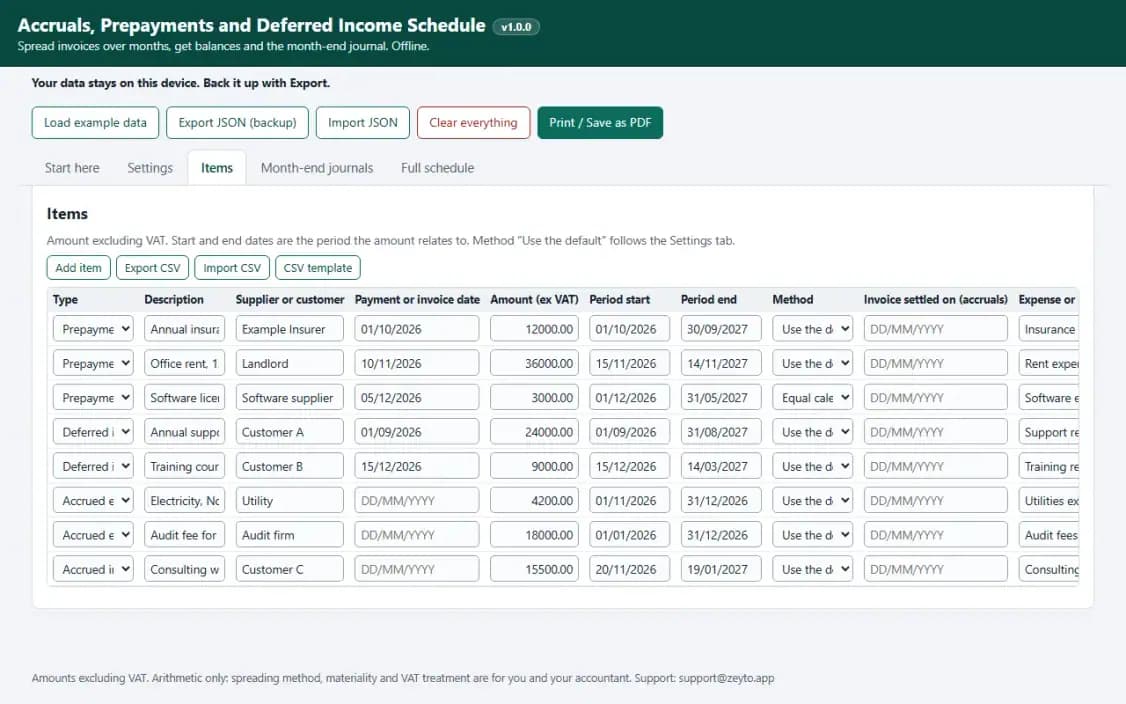
Items, with the example data
Try it now
Click through the real app. No download, no sign-up.
Demo with fictional example data. Nothing you type is saved. Printing, export and backup are switched off in the demo; the full app has them.
What you get
- Prepayments, deferred income, accrued expenses and income
- Daily or equal-month spreading, per item
- Balances at any date and the month's amounts
- Month-end journals that balance, printable
- Full schedule per item with CSV import and export
- README worked example, example data, JSON backup
Files and sizes (2)
- accruals-prepayments-deferred-income-schedule.zip21 KB
- README.txt5.8 KB
2 files, 27 KB in total. You download them from your order page after payment.
What it does not do
- Decide the VAT treatment, materiality and spreading method.
- No usage-based or milestone patterns.
- Your data stays in one browser on one device: no cloud sync, so export a backup.
After you buy
- Instant downloadYour order page opens right after payment with a secure link for each file. The link is emailed to you too.
- A fresh link any timeLinks last 48 hours. Enter your order reference and the email you paid with and we will send a new one.
- Help is one email awayWrite to info@emeron.io with your order reference. The team answers every enquiry.
- Fix, replace or refundIf a file is damaged, will not open, or is materially different from its listing, tell us within 7 days of the sale and we will fix it, replace it or refund you.
Find my purchasesContact the Zeyto teamMarketplace terms
Full refund wording
Digital downloads (files, templates, skill packs, guides) are delivered straight away, so they are not refunded once downloaded. If a file is damaged, will not open, or is materially different from its listing, tell us within 7 days of the sale and we will fix it, replace it or refund you.
Applies to products sold by Zeyto itself. None of this takes away rights you have under UAE law.
About this product
Read the full description
Month-end adjustments for insurance, rent, licences, annual contracts billed in advance and audit fees are usually done in a spreadsheet rebuilt every month, with rounding that never quite adds up. This app takes each item once with the period it covers and keeps the schedule.
What is inside
- Four item types: prepayment, deferred income, accrued expense and accrued income, each with the amount excluding VAT, the period it covers and, where it applies, the payment or settlement date.
- Two spreading methods: actual days or equal calendar months, set as a default and overridable per item.
- The balance sheet balance at your balance date, the amount recognised in the month, and month-end journals that balance.
- A full month-by-month schedule for every item, exported as CSV, with CSV import for a list of items.
- Rounding carried in the running total, so the months always add up to the amount.
- A printable A4 journal page, example data, JSON backup and a README with a worked example in numbers.
What is fact and what is a setting This is arithmetic and states no UAE rule. How VAT is treated on an advance invoice or prepayment, which spreading method fits an item, your materiality limit and whether to book an accrual are your accounting policy and your accountant's call.
What it is NOT It does not model usage-based or milestone patterns, part payments or price changes, and it does not post to an accounting system. It is not accounting or tax advice.
How it was checked Balances, monthly amounts and journal totals were compared with an independent Python Decimal calculation over 40 random sets of items, with no difference. Typed screens, CSV, exports, reload, print view and phone width were tested in Chromium. Not tested in Safari, Firefox or Edge. Single business use.
Questions
Who is it for?
What do I need to use it?
How do I get it?
What if the file is wrong?
Accruals, Prepayments and Deferred Income Schedule with Month-End Journals: AED 69
Pay once, download at once.
Damaged, will not open or not as listed? Tell us within 7 days and we fix it, replace it or refund you.
Questions before you buy? Contact the Zeyto team. This is sold by Zeyto (Emeron Infospace FZE) itself, not by an independent seller. See the marketplace terms.
Not sure it is the right one?
Works well with
Other official products that cover the same ground or finish the job.
- Download
UAE Accounting Calculators: Fixed Assets, IFRS 16 Leases, ECL Provision and Accruals
Four offline accounting calculators in one download: a fixed asset depreciation register, an IFRS 16 lease calculator, a receivables ECL provision matrix and an accruals, prepayments and deferred income schedule. Cheaper than buying them one by one.
Also about month-end, offline-app, uaeAED 119Instant download - Download
Fixed Asset Register and Depreciation Schedule with Journals (Offline App)
An offline fixed asset register with straight line, reducing balance and units of production, month conventions you choose, disposals with gain or loss, a by-category movement table, balanced journals and a projection of up to 15 years.
Also about offline-app, uaeAED 69Instant download - Download
IFRS 16 Lease Calculator for SMEs: Liability, Right-of-Use Asset, Schedule and Journals
An offline lease register that works out the lease liability, the right-of-use asset, the monthly interest and depreciation schedule, the journals and the current and non-current split at your reporting date. A working tool, not an audit tool.
Also about offline-app, uaeAED 79Instant download - Download
Cleaning Job Schedule and Crew Assignment Calendar
Offline scheduler for a cleaning company: jobs with a crew, a start time and hours, a rule that refuses a job overlapping another job of the same crew, a travel gap setting, an overloaded day flag, a calendar, jobs to confirm with WhatsApp, and a printed crew sheet and job card.
Also about offline-app, uaeAED 59Instant download